A Professional Drone Client Portal Under Your Brand
Give every customer one organized place to view photos, maps, models, measurements, reports, and project files — in the browser, with no login. DataDelivery by National Drone Services turns finished drone data into a delivery experience that looks like part of your business.
Free plan — no credit card required. Your client only needs the link.
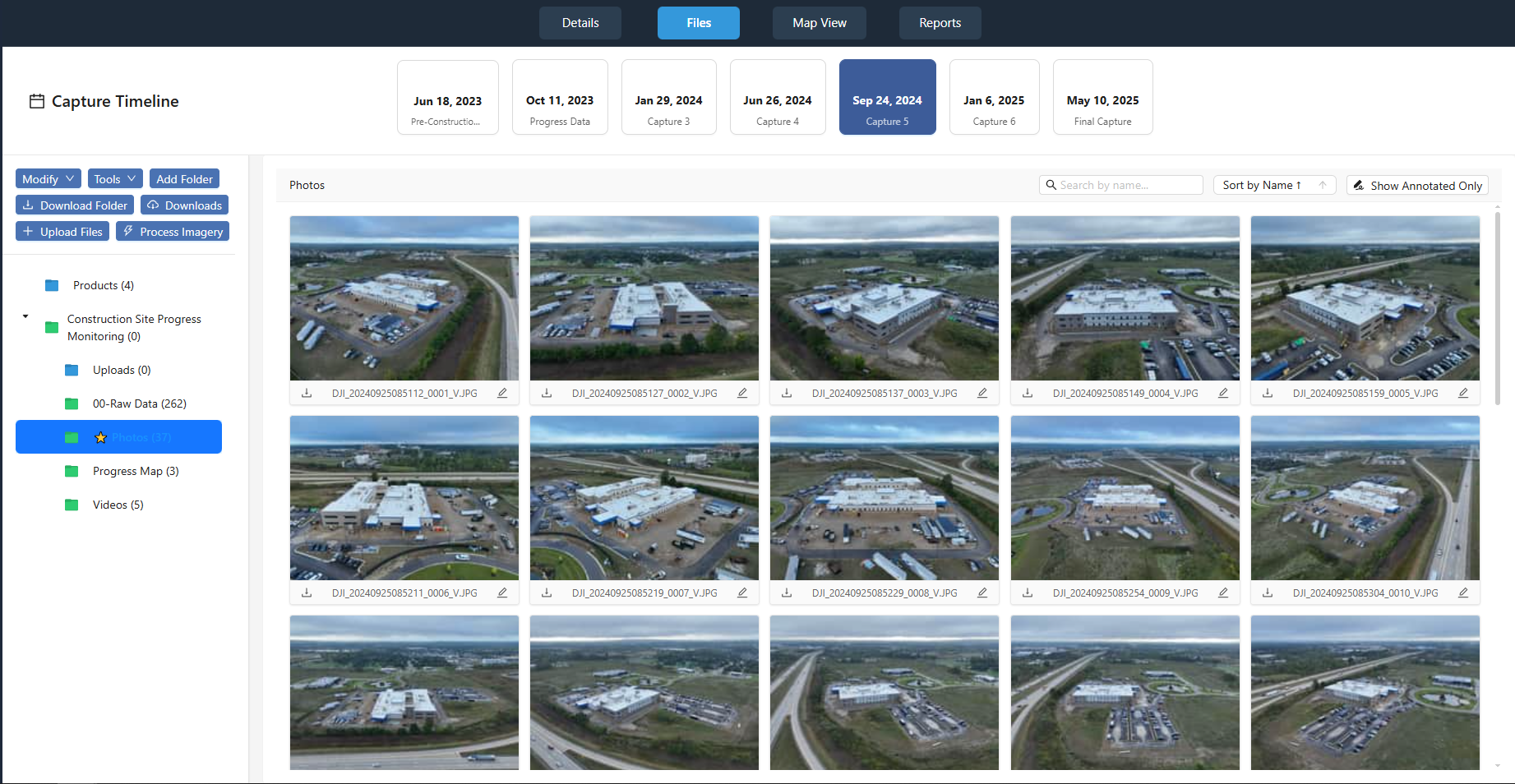
What is a drone client portal?
A drone client portal is a single web page where your customer views everything you captured and produced for a project: photos and video, orthomosaics on a map, 3D point clouds, 360° aerial panoramas, measurements, annotations, reports, and downloadable files. Instead of emailing a download link to a folder full of filenames, you send one portal link. The client opens it in a browser and explores the project. Invited clients you add to the job can also download only the files they need.
In DataDelivery, the portal is generated from the job you already organized — no separate "website" to build. Because it lives under your branding and (on higher plans) your own domain, the delivery looks like a finished product from your company rather than a generic file dump.
File storage is not the same as data delivery
A shared folder stores files. A client portal helps your customer actually use them. That difference is what your delivery is selling.
A generic cloud folder
- A long list of filenames the client has to decode.
- Huge orthomosaic and point-cloud files the client cannot open without specialist software.
- No map, no context, no measurements, no way to compare dates.
- Branding that belongs to the storage provider, not you.
A DataDelivery client portal
- Orthomosaics on an interactive map and point clouds in a browser viewer.
- Captures organized by date, with side-by-side comparison for recurring work.
- Measurements, annotations, and reports presented in context.
- Your brand — and downloads still available when the client wants the raw files.
Everything from one project, in one place
A DataDelivery job collects every deliverable type a drone service provider produces, so the client sees the whole project — not scattered files.
Photos & video
Standard images (JPG/PNG), MP4 video, and 360° aerial panoramas in purpose-built viewers.
Maps & orthomosaics
Georeferenced orthomosaics displayed on an interactive map with zoom, pan, and measurement tools.
3D point clouds
Point clouds viewable directly in the browser — clients navigate and measure with nothing to install.
Measurements & annotations
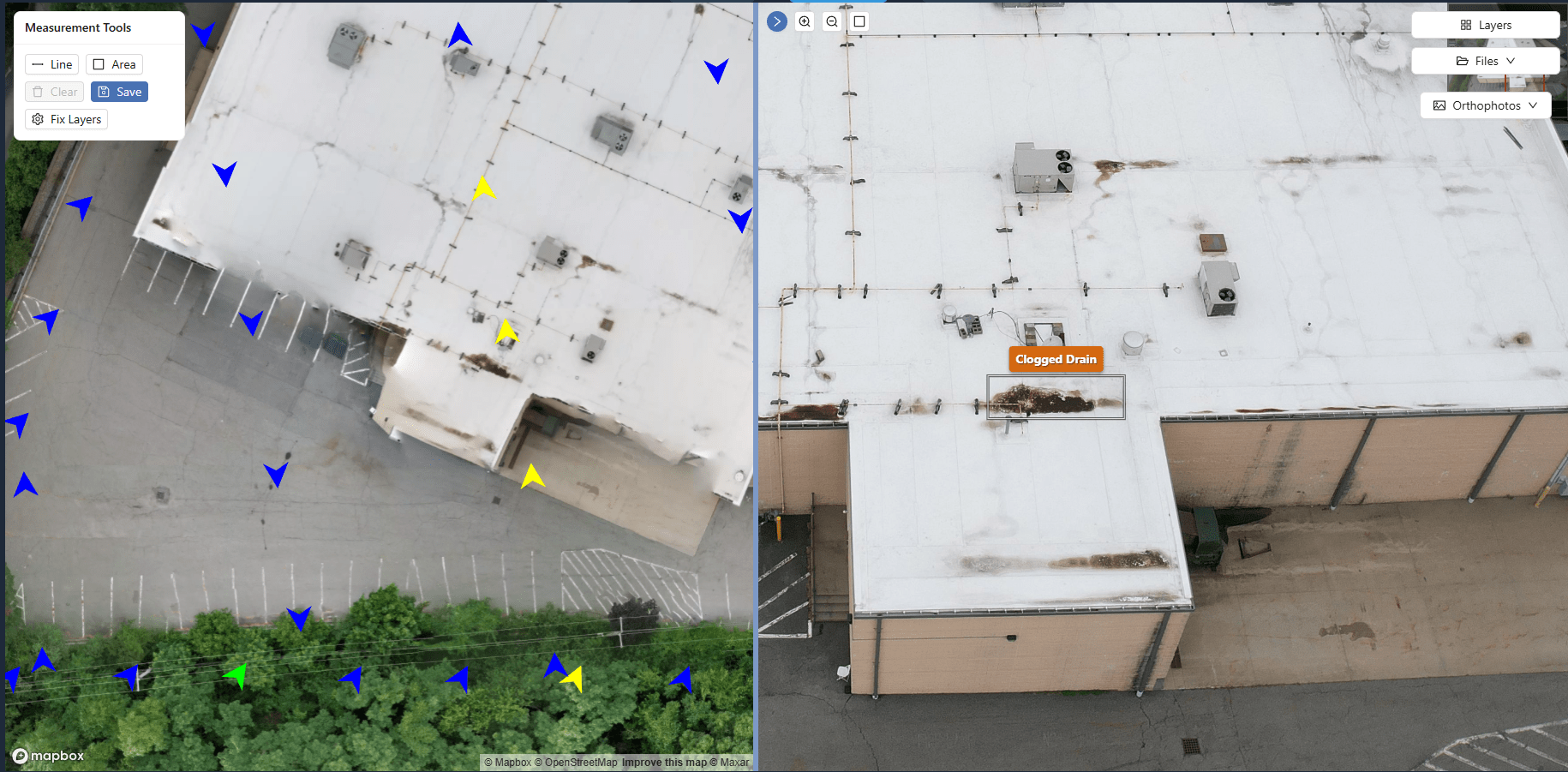
Area and distance measurements, plus annotations that mark issues and add notes on the imagery.
Reports
Client-ready reports built from the job's data, with multiple portal views per job for different stakeholders.
Project files
Downloadable deliverables, plus PDF documents and YouTube or Vimeo links kept alongside the rest of the project.
What your client experiences
The portal opens in any modern browser. There is nothing to install and no account to create — the client clicks your link and starts exploring the project.
- Browse imagery by location on a map, not by filename.
- Open 360° panoramas, point clouds, and full-resolution photos.
- See measurements and annotations exactly where they apply.
- Download individual files or full folders once you invite them to the job with download access.
You stay in control of every link
Delivery should be easy for the client and controlled for you.
Shareable link, no login
Send one URL. The client never creates an account, and you can revoke access at any time.
Preview Mode
Preview Mode shows signed-in clients a capture with a PROOF watermark and hides download buttons until you switch it off.
Multiple views per job
Create more than one portal view from the same job for different stakeholders or use cases.
Note: DataDelivery outputs are intended for visualization, documentation, and client delivery. Measurements are approximate and are not a substitute for a licensed surveyor. They are not intended for engineering, legal, or ground-control use.
From project to client portal in six steps
The same workflow whether you deliver one capture or a recurring project.
-
1
Create or upload a project
Start a job and drag in photos, video, and panoramas. Each flight becomes a dated capture.
-
2
Organize the deliverables
Process orthomosaics and point clouds, add measurements, annotations, and reports.
-
3
Configure branding and access
Apply your branding, choose what the client can see, and decide on preview or full access.
-
4
Send the project link
Share one URL. No login, no install — the client opens the portal in a browser.
-
5
Let the client view the job
Clients view the project and review your saved measurements and annotations in the browser. Invited clients you add to the job can download the files you allow, and you can see what each of them opened and downloaded.
-
6
Add future captures
Add new captures to the same project over time so the portal stays current for recurring work.
Who delivers through a client portal
Any drone service provider whose customers need to understand the data — not just store it.
Construction & site monitoring
Deliver recurring captures and progress comparisons to owners and contractors.
Inspection providers
Present annotated imagery and condition notes from your inspections so clients can review them in context.
Mapping & survey support
Share orthomosaics and point clouds in the browser instead of shipping giant files.
Real estate & property
Hand clients a polished portal of imagery and panoramas under your brand.
See a real client portal
Open a live, no-login portal — the same experience your clients get. Every interface shown on this page is the actual platform.
Frequently asked questions
What is a drone client portal?
A drone client portal is a web page where your customer views the deliverables from a drone project: photos, orthomosaics, point clouds, 360° panoramas, measurements, annotations, reports, and downloadable files, organized in one place. With DataDelivery, the portal opens in a browser through a shareable link, so your client does not download a pile of files or install any software.
Do my clients need an account or login?
No. Clients open the portal through a shareable link with no login required. Only you, the drone service provider, need a DataDelivery account. You control access and can revoke a link at any time.
How is a client portal better than a Google Drive or Dropbox folder?
A cloud-storage folder is a list of filenames. A client portal presents the same data as an interactive experience: orthomosaics on a map, point clouds in a 3D viewer, captures organized by date, measurements and annotations in context, and reports. Clients can still download files, but they do not have to in order to understand the project.
Can I control what each client can see and do?
Yes. You share a job through a link, control access, and can revoke it anytime. You can also turn on Preview Mode, which shows signed-in clients a capture with a PROOF watermark and hides download buttons until you switch it off.
What kinds of files can I deliver in the portal?
Photos and standard images, MP4 video, 360° aerial panoramas, orthomosaics, point clouds, measurements, annotations, reports, and project files. You can also include PDF documents and YouTube or Vimeo video links.
Can I add new captures to the same project later?
Yes. Each job is organized into captures by flight date, and you can add new captures to an existing job. For recurring work, clients can compare two capture dates side by side to see what changed.
Keep exploring DataDelivery
White-label drone portal
Deliver every project under your own branding and custom domain.
DataDelivery pricing
Compare plans, from the free tier to higher capacity and branding.
DataDelivery vs. DroneDeploy
See how DataDelivery compares as a DroneDeploy alternative for service providers.
How to deliver drone data to clients
Email, file transfers or a client portal: which fits each deliverable.
Deliver your next project through a real client portal
Start free, process a job, and send a branded, no-login portal your client can actually use.
Free plan — no credit card required.