Deliver Drone Data Under Your Own Brand
Hand clients a portal with your logo and business name, and on Premium and Enterprise, your own domain. With DataDelivery by National Drone Services, the delivery looks like a finished product from your company, not a third-party tool.
Free plan — no credit card required. Custom branding on Basic and up.
Your Client Portal
portal.yourcompany.com
What does white-label drone delivery mean?
White-label drone delivery means the portal your client opens carries your branding instead of the platform's. With DataDelivery you add your own logo and business name, and on Premium and Enterprise you deliver projects on your own domain, such as portal.yourcompany.com. To the client, the delivery looks and feels like part of your business, not a generic third-party file tool.
Underneath, you still get the full DataDelivery experience: orthomosaics on a map, point clouds in the browser, 360° aerial panoramas, measurements, annotations, and reports. The difference is what the customer sees. When a project arrives under your brand and your URL, it reinforces that your company produced the work — which is the part of the experience your customers remember.
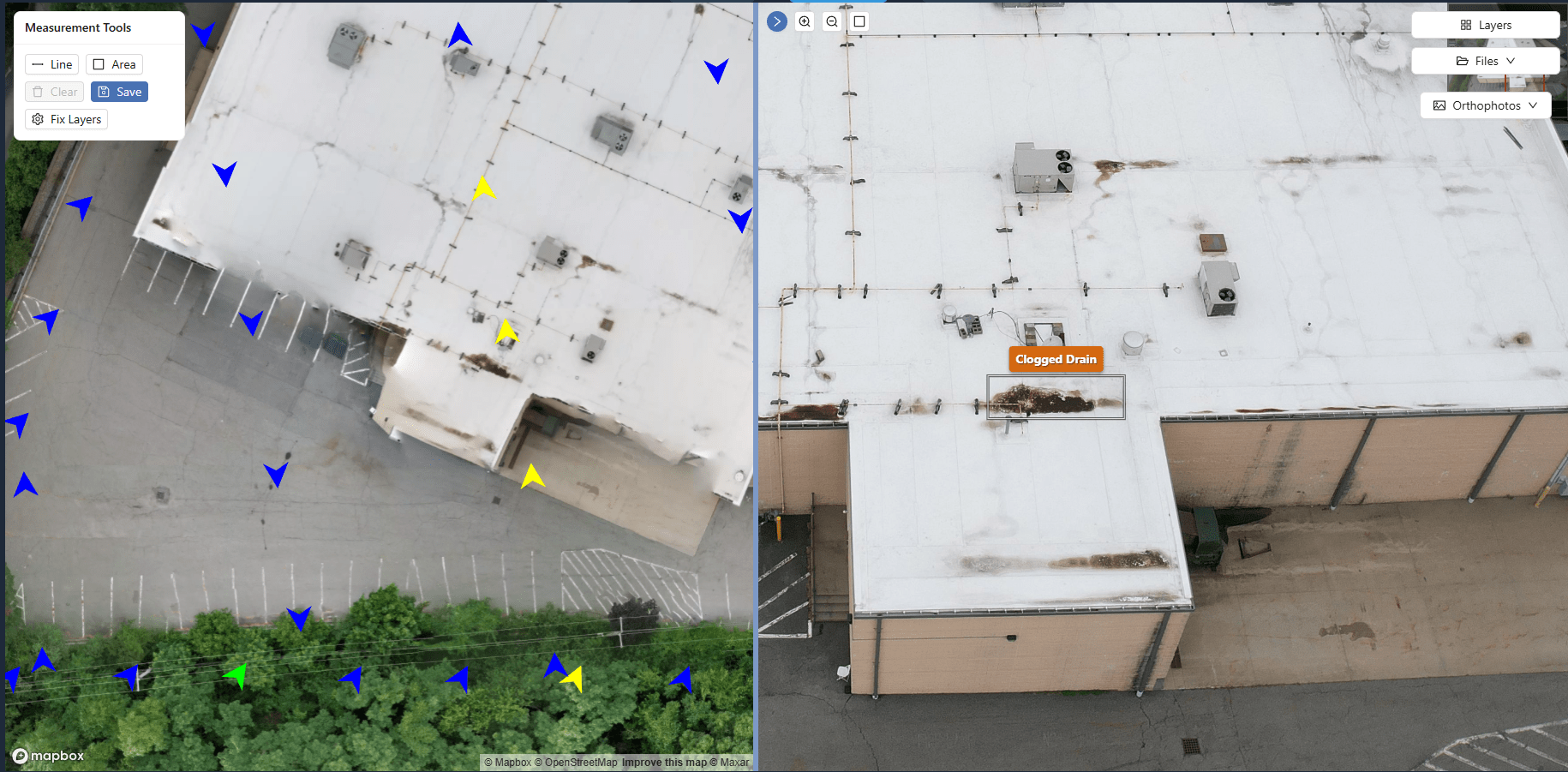
What your customer sees
When you apply custom branding, the customer-facing portal carries your logo and business name, and on Premium and Enterprise, your own domain. Pages on Free, Starter and Basic show a small "Powered by DataDelivery" link; Premium and Enterprise remove it.
- Your logo and business name on the pages and emails they open.
- Your own URL, such as portal.yourcompany.com, on higher plans.
- One shareable link — no account to create and no login screen.
- An interactive project — imagery on a map, point clouds, panoramas, measurements, and reports — that feels like your product.
Custom branding is available on the Basic plan and up; a custom domain is available on Premium and Enterprise.
The branding controls you get
Make the delivery experience your own — these are the white-label controls DataDelivery supports.
Your logo and business name
Put your own logo on client-facing pages and emails. Once you add your business name, client emails go out under that name, and replies come straight to you.
Logo on Basic and up
Custom domain
Deliver projects at your own URL, such as portal.yourcompany.com, instead of a shared address.
Available on Premium & Enterprise
No "Powered by" link
Pages on Free, Starter and Basic show a small "Powered by DataDelivery" link. Premium and Enterprise remove it. Adding your logo on Basic does not remove it.
Available on Premium & Enterprise
No-login client access
Send a no-login link: anyone with it can view the job's files, maps and imagery in a browser, with no account and nothing to install.
Available on plans including Free
Putting your brand on the portal
Set branding once in your account, then deliver from your own address.
-
1
Brand the portal
In your account settings, add your business name and upload your logo (Basic and up) so client pages and emails carry your identity.
-
2
Connect your domain
On Premium or Enterprise, connect a custom domain such as portal.yourcompany.com so deliveries live at your own URL.
-
3
Deliver at your URL
Share emails, job links and report links use your own domain. The SSL certificate is issued for you once your DNS records are in place.
White-label portal vs. a generic cloud-storage link
The deliverables can be the same files — the impression they leave is not.
| White-label DataDelivery portal | Generic cloud-storage link | |
|---|---|---|
| Branding | Your logo, business name and your own domain. | Branding options vary by provider and plan. |
| Client trust | Looks like a finished product from your company. | Looks like a generic shared folder. |
| Client access | Invite by email, or send a no-login link (including on the Free plan). Revoke either at any time. | A shared folder or file link. |
| What the client sees | Imagery on a map, point clouds, panoramas, measurements, and reports. | Files and previews, but no map view for GeoTIFFs and no LAS point cloud viewer. |
Who benefits most from white-label delivery
Branding matters most when the customer relationship is the product.
Established drone service providers
Keep every deliverable consistent with the brand you have already built, from proposal to portal.
Agencies & resellers
Present drone projects as your own service line under your name and domain, not a vendor's tool.
Repeat-client work
Anyone delivering to the same clients over time builds recognition when every portal carries your brand.
An example branded delivery workflow
From a finished flight to a portal that opens under your brand.
-
1
Set your branding once
Add your business name and logo in account settings, and connect your domain on Premium or Enterprise.
-
2
Create or upload a project
Start a job and add photos, video, and panoramas. Each flight becomes a dated capture.
-
3
Organize the deliverables
Process orthomosaics and point clouds, then add measurements, annotations, and reports.
-
4
Choose access
Give each invited client a permission level, or turn on Preview Mode to show signed-in clients a capture with a PROOF watermark and no download buttons.
-
5
Send the branded link
Invite your client by email, or send a no-login link, including on the Free plan. With a custom domain, share emails and links use your own address.
-
6
Add future captures
Add new captures to the same job over time so your branded portal stays current for recurring clients.
See a live sample report
Open a live sample report with no login, exactly as your client would see it.
Frequently asked questions
What does white-label mean for drone delivery?
White-label means the portal your client sees carries your branding instead of the platform's. With DataDelivery you add your own logo and business name, and on Premium and Enterprise you can deliver projects on your own domain, such as portal.yourcompany.com. The client experiences the delivery as a product of your business, not a third-party tool.
Will my clients see "National Drone Services"?
On Premium and Enterprise, share emails, job links and report links use your own domain, and pages drop the small "Powered by DataDelivery" link. On Free, Starter and Basic, pages show that link. Your logo appears on client pages and emails from the Basic plan. Client emails sent under your business name still carry a short "Delivered securely with DataDelivery" footer.
Can I use my own domain?
Yes. On the Premium and Enterprise plans you can deliver from your own address, such as portal.yourcompany.com: share emails, job links and report links use your domain. DataDelivery gives you the exact DNS records, and the SSL certificate is issued for you once they are in place.
Which plans include custom branding and a custom domain?
Your logo is available on the Basic plan and up. A custom domain is available on the Premium and Enterprise plans, and those plans also remove the small "Powered by DataDelivery" link. The Free and Starter plans deliver projects on the standard portal.
Do my clients need to log in?
No. You can send a no-login link, including on the Free plan: anyone with it can view the job's files, maps and imagery in a browser, with no account and nothing to install. You can revoke the link at any time. Clients you invite by email get a free account instead, and for them you can turn on Preview Mode, which shows a PROOF watermark and hides download buttons.
Keep exploring DataDelivery
Drone client portal
See how the client portal presents a drone project in the browser.
DataDelivery pricing
Compare plans and find the tier that includes custom branding and a custom domain.
Construction progress portal
Deliver recurring captures and before and after comparisons under your own brand.
DroneDeploy alternatives
Pricing, strengths and the options worth comparing in 2026.
Deliver your next project under your own brand
Start free, add your business name, and add your logo from the Basic plan. Then send your client a portal they can actually use.
Free plan — no credit card required. Custom branding on Basic and up.