Measure Stockpiles and Deliver Results to Clients
Capture a site, process a surface, define the pile boundary, and calculate a volume — then deliver the result, reports, maps, and project history through a professional client portal. DataDelivery by National Drone Services brings measurement and reporting into one workflow for aggregate, earthwork, mining, recycling, and construction work.
Free plan — no credit card required. Your client only needs the link.
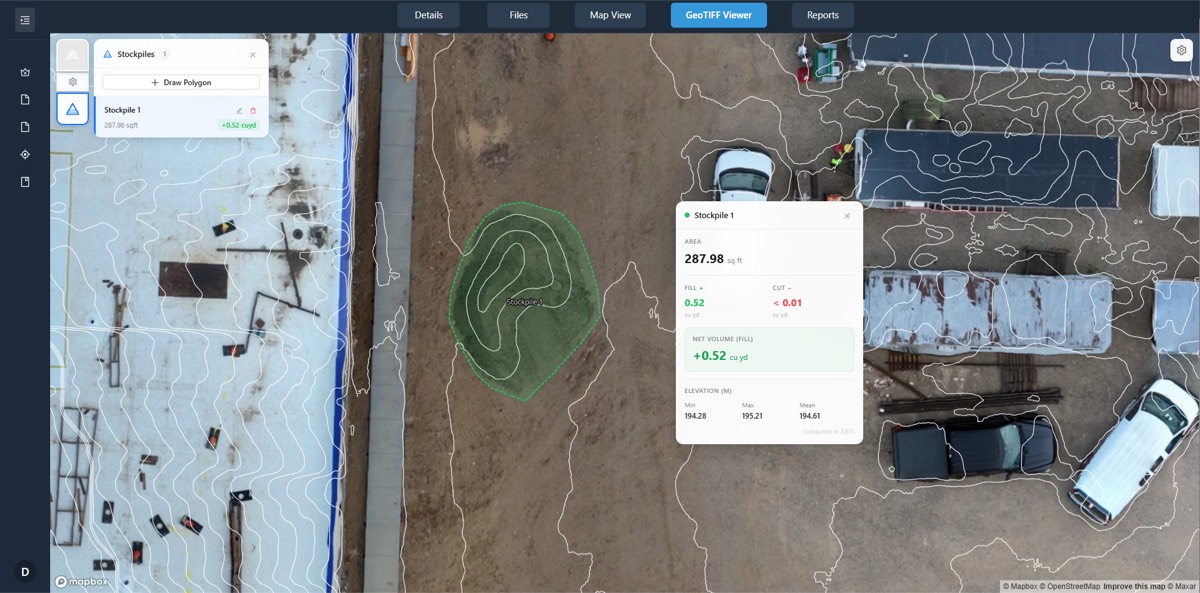
Measure stockpiles from drone data
Drone stockpile measurement turns aerial imagery into a usable volume. You capture the site with a drone, process the imagery into a surface, define the pile boundary on that data, and calculate a volume from the elevation surface. The result is a number you can document, track, and hand to a customer — without shipping raw files or specialist software.
In DataDelivery, the whole sequence lives in one job. Built-in image processing generates orthomosaics and point clouds from your raw imagery, you measure the pile once an elevation surface is available, and you deliver the result through a branded, no-login client portal. Because measurement and reporting share the same job, the volume you calculate and the portal your client opens are always in sync.
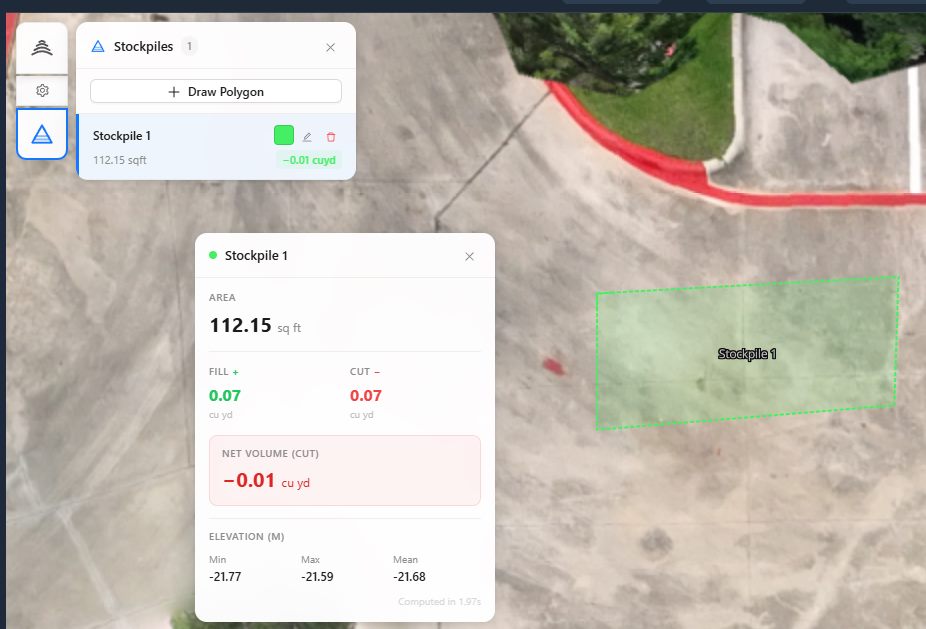
The measurement workflow
Every stockpile result follows the same path, from the flight to the customer:
- Data capture — fly the site with sufficient overlap over the pile.
- Processing — turn the raw imagery into orthomosaics and point clouds.
- Surface generation — produce the elevation surface the measurement reads from.
- Measurement — define the pile boundary on the data.
- Volume calculation — calculate the volume from the surface.
- Client review — review the result and supporting imagery in the portal.
- Delivery — share volumes, reports, and history with the customer.
Built-in stockpile measurement
Measurement is part of the platform — not a separate tool you bolt on afterward.
Define a pile boundary
Draw the boundary of the pile directly on the drone data and calculate a volume from it — no exporting to a separate application.
Requires an elevation surface
Volume is calculated from an elevation surface, so a DSM must be present for the site. DataDelivery generates the surfaces from your raw imagery during processing.
Track results over time
Measurements and history can be tracked over time and delivered through the same client portal, so recurring inventory work stays in one place.
From flight to delivered volume in eight steps
The same workflow whether you measure one pile or a whole yard on a recurring schedule.
-
1
Plan and capture the stockpile area
Plan a flight with good coverage and overlap, then capture the pile and surrounding ground.
-
2
Process the imagery
Generate orthomosaics and point clouds from the raw imagery with built-in processing.
-
3
Review the generated surface
Confirm the elevation surface for the site looks complete before measuring.
-
4
Define the pile boundary
Draw the boundary of the pile on the data so the platform knows what to measure.
-
5
Select or verify the base plane
Check the base the volume is measured against so the calculation reflects the pile.
-
6
Calculate the volume
Run the measurement to calculate a volume from the elevation surface.
-
7
Save the result or add it to a report
The result stays saved in the job, and you can add it to a report.
-
8
Deliver the measurement to the customer
Share the volume, reports, and history through a branded, no-login client portal.
Who measures stockpiles with drones
Any operation that needs to document material volumes and report them to a customer or stakeholder.
Aggregates
Track sand, gravel, and rock inventory across a yard between captures.
Earthwork
Document soil and fill piles for progress and inventory records.
Mining
Capture and report material stockpiles across a working site.
Recycling
Document piles of processed and unprocessed material for inventory.
Construction
Measure material on site and share results alongside progress imagery.
Accuracy and methodology
A stockpile volume is only as good as the data behind it, and that data depends heavily on how the site is captured and processed. Results depend on factors such as:
- Flight planning
- Image quality and overlap
- Ground sampling distance
- How visible the pile surface is
- Ground control used during capture
- Checkpoints used during capture
- Base-plane selection
- Processing settings
- Operator methodology
Ground control and checkpoints are capture-side best practices that can improve confidence in a result. They are methodology choices the pilot makes in the field — National Drone Services does not provide a ground-control (GCP) workflow as a platform feature.
Important: DataDelivery outputs are intended for documentation and inventory tracking. Measurements are approximate and are not a substitute for a licensed surveyor. They are not intended for engineering, legal, or ground-control use. We do not promise a specific accuracy level or percentage. The confidence of any measurement comes from the capture and processing methodology behind it.
Delivery and reporting
A volume is more useful when the customer can see it in context. DataDelivery delivers measurement results the same way it delivers the rest of the project.
- Deliver volumes, reports, maps, and project history through the client portal.
- Add client-ready reports with multiple portal views per job.
- Export map measurement layers (distance and area) as GeoJSON for your own records. Stockpile results stay in the job and in your reports.
- Use recurring captures so clients can track how piles change over time.
- Compare two capture dates to show the change between visits.
One portal, no login
- Send one shareable link — the client never creates an account.
- Control access and revoke a link at any time.
- Links expire after 90 days by default, and you can change the date.
- No-login links are view-only by default; invited clients you add to a job can download the files you allow.
See a real client portal
Open a live, no-login portal — the same experience your clients get. Every interface shown on this page is the actual platform.
Frequently asked questions
How does drone stockpile measurement work?
You fly the stockpile site to capture overlapping aerial imagery, process that imagery into a surface, define the pile boundary on the data, and the platform calculates a volume from the elevation surface. In DataDelivery, processing, measurement, and delivery happen in one place: you process orthomosaics and point clouds from the raw imagery, draw the pile boundary, calculate the volume, and share the result through a client portal.
How accurate are drone stockpile volumes?
Accuracy depends on your capture and processing methodology, not just the platform. Factors include flight planning, image quality and overlap, ground sampling distance, how visible the pile surface is, the use of ground control and checkpoints during capture, processing settings, base-plane selection, and operator methodology. DataDelivery outputs are intended for documentation and inventory tracking. Stockpile results are estimates, not surveyed quantities. Measurements are approximate and are not a substitute for a licensed surveyor, and we do not promise a specific accuracy level or percentage.
What do I need to measure a stockpile?
You need a processed elevation surface for the site. The stockpile measurement tool requires an elevation surface (a DSM) to be present so it can calculate volume. DataDelivery generates orthomosaics and point clouds from your raw imagery, and you measure once the surface is available.
Can I track a stockpile over time?
Yes. Jobs are organized into captures by date, and you can add new captures to an existing job. Measurement results and history can be tracked over time, and clients can compare two capture dates to see how a pile has changed between visits.
How do I deliver the result to my client?
You deliver volumes, reports, maps, and project history through a shareable client portal that opens in a browser with no login. You control access and can revoke a link at any time. You can also include the result in client-ready reports, with multiple portal views per job.
Keep exploring DataDelivery
Construction progress portal
Deliver recurring captures and progress comparisons to owners and contractors.
Reports
Build client-ready reports with multiple portal views per job.
Share orthomosaics with clients
Present georeferenced maps in the browser instead of shipping giant files.
Integrations
Bring finished maps and point clouds from your mapping software.
Measure a stockpile and deliver the result
Start free, process a job, measure the pile, and send a branded, no-login portal your client can actually use.
Free plan — no credit card required.