Share Orthomosaics Without Sending Massive Files
Orthomosaic GeoTIFFs are big, and most clients cannot open them without specialist software. This guide shows a practical workflow for delivering them through a browser-based client portal. Your client zooms, pans, and sees your saved measurements on the map, and invited clients you add to the job can download the original file when they actually need it.
Free plan — no credit card required. Your client only needs the link.
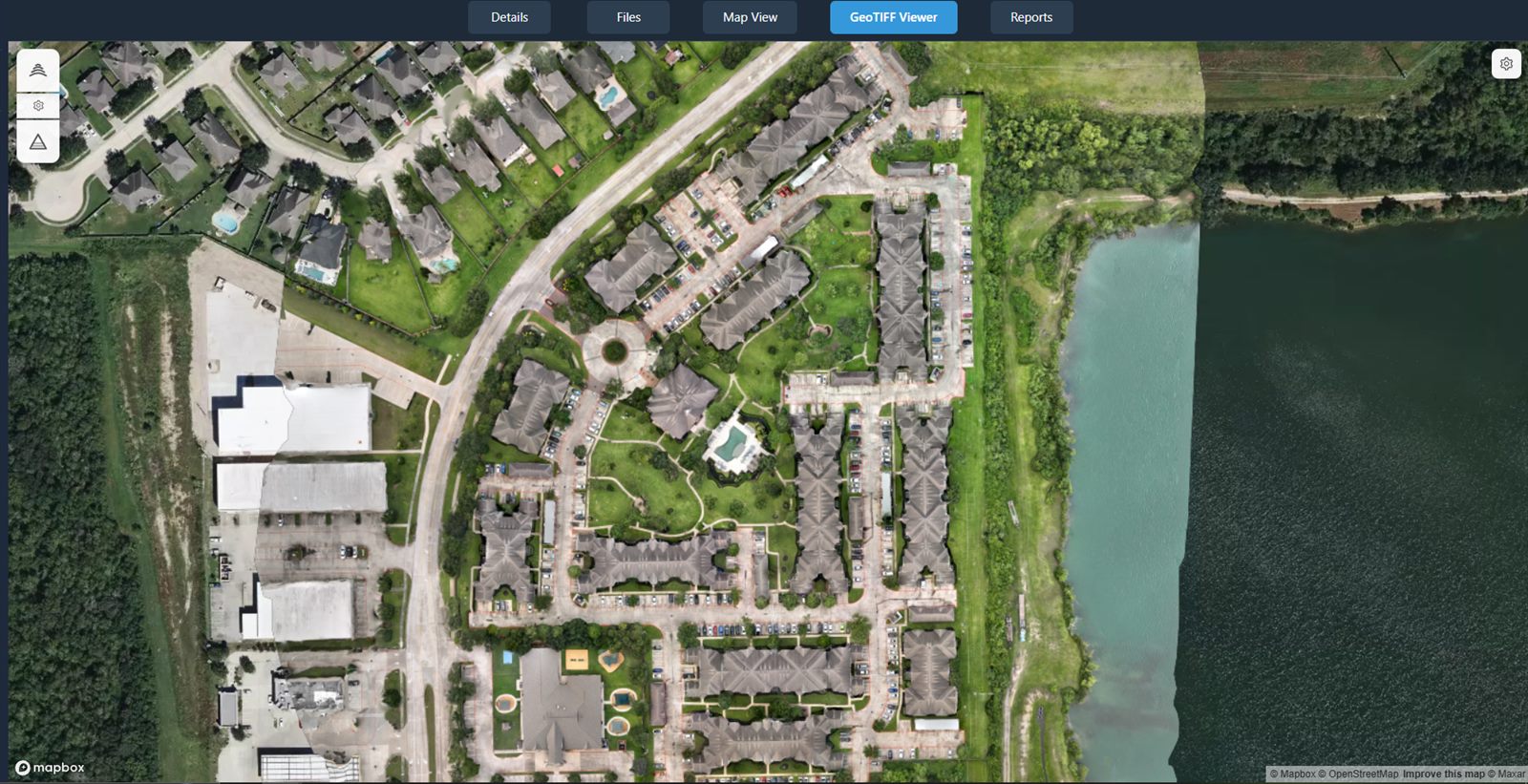
What is an orthomosaic?
An orthomosaic is a single, georeferenced, distortion-corrected aerial map stitched together from many overlapping drone photos. The photogrammetry process removes the perspective distortion you see in an individual aerial shot and ties the result to real-world map coordinates, so the whole site reads as one continuous, top-down map rather than a stack of separate images.
Because it is georeferenced and distortion-corrected, an orthomosaic lets you pan across an entire property as a single map and take measurements of area and distance directly on it. That makes it one of the most useful deliverables a drone service provider can hand to a client — as long as the client can actually open it.
The problem with delivering orthomosaics as files
Handing over a raw GeoTIFF puts most of the work on the client — and that is exactly where deliveries stall.
The files are huge
Orthomosaic GeoTIFFs are often very large. They blow past email attachment limits and are slow and awkward to move through cloud storage on both ends.
Clients lack the software
A GeoTIFF typically needs specialist desktop GIS software to open. Most clients do not have it installed and have no reason to learn it just to look at one map.
No context, no measurements
A downloaded file is just a file. There is no map to navigate, no measurement tools, and no annotations to explain what the client is looking at.
Version confusion
When you send a new orthomosaic for the same site, the client now has two files and has to remember which is current. Re-processing means re-downloading.
Share orthomosaics in the browser instead
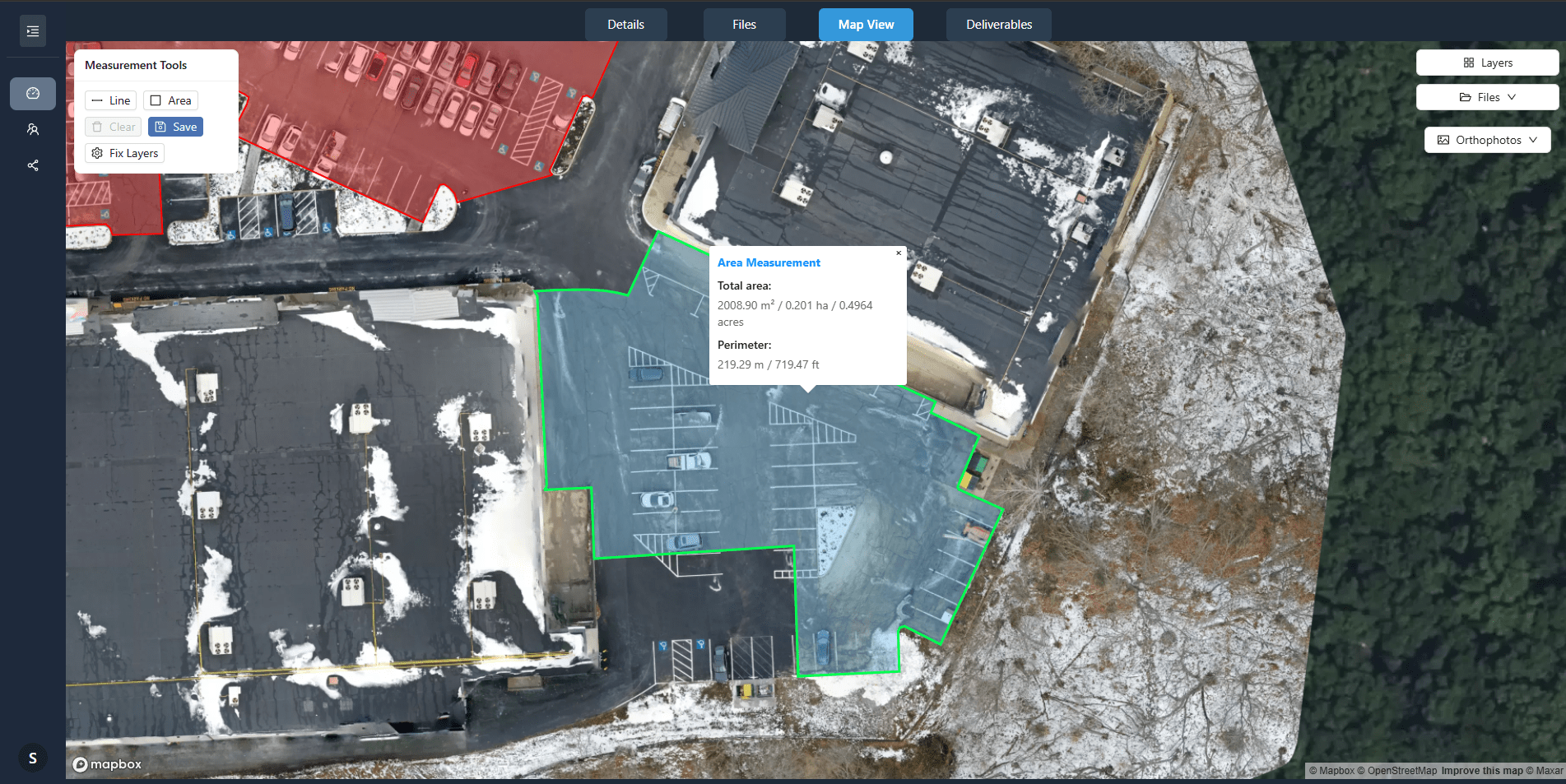
With DataDelivery, the orthomosaic displays on an interactive map. You send one shareable link, the client opens it in any modern browser with no login, and the whole site is there to explore — nothing to download first, nothing to install.
- Zoom, pan, and navigate the full orthomosaic on a map.
- See your saved measurements, or measure distance, area and perimeter themselves when you give them measure access. Measurement layers export as GeoJSON.
- Review annotations that mark issues or add notes on the imagery.
- Download the original file or full folders once you invite them to the job with download access. No-login links are view-only by default.
A note on coordinate systems
Orthomosaics carry embedded geospatial data, so a few quick checks keep your delivery clean.
- An orthomosaic is georeferenced — the geospatial information that ties it to map coordinates is embedded in the file itself.
- Confirm the coordinate reference system (CRS) of your output before delivery, and note it for the client so anyone who imports the GeoTIFF later knows how it is referenced.
- Treat these outputs as visualization and documentation deliverables. Measurements are approximate and are not a substitute for a licensed surveyor. They are not intended for engineering, legal, or ground-control use.
How to share an orthomosaic with a client, step by step
A repeatable workflow that turns a finished orthomosaic into a browser link your client can use.
-
1
Process or prepare the orthomosaic
Use built-in processing to generate a georeferenced orthomosaic (GeoTIFF) from your raw drone imagery — no separate photogrammetry software — or bring in an orthomosaic you have already produced.
-
2
Confirm the coordinate reference system
Check the CRS of the output and make a note of it for the delivery, so the client and anyone they share the file with knows how it is georeferenced.
-
3
Upload or publish the deliverable
Add the orthomosaic to a job. It displays on the interactive map so it is ready to view in the browser instead of only as a download.
-
4
Configure client access
Decide what the client can see and do. Apply your branding and choose whether invited clients you add to the job can download files. No-login links are view-only by default, and you can revoke one anytime.
-
5
Add supporting reports or files
Round out the delivery with reports, PDFs, photos, video, 360° panoramas, or a point cloud — kept alongside the orthomosaic in the same project.
-
6
Share the browser link
Send one shareable URL. No login and no install — the client opens the orthomosaic on the map in a browser.
-
7
Allow downloads where appropriate
When the client needs the raw GeoTIFF, invite them to the job with download access so they can pull individual files or full folders, on your terms, after they have already seen the data in context.
What to include alongside an orthomosaic
A strong delivery is more than one image. Assemble the supporting pieces that make the orthomosaic usable — include each one where it is relevant to the project.
A PDF summary
A short document that explains what was captured and what the client is looking at.
The GeoTIFF original
The full-resolution georeferenced file, available for download where you choose to allow it.
A JPEG or PNG overview
A lightweight image of the site that anyone can open instantly, even without the original file.
CAD or GIS files
Where the client's team works in those tools, include the formats they will import the data into.
Flight date & coordinate-system info
Record when the site was flown and the coordinate reference system the orthomosaic uses.
Accuracy notes & usage limitations
State plainly what the deliverable is for: visualization and documentation, not engineering use. Measurements are approximate and are not a substitute for a licensed surveyor.
These are pieces you, the provider, assemble for the delivery — include each where it fits the project. DataDelivery keeps them together in one job: supported files include orthomosaics, point clouds, photos (JPG/PNG), MP4 video, 360° aerial panoramas, PDFs, and YouTube or Vimeo links.
See an orthomosaic in a real portal
Open a live, no-login portal — the same browser experience your clients get. Every interface shown on this page is the actual platform.
Frequently asked questions
What is an orthomosaic?
An orthomosaic is a single, georeferenced, distortion-corrected aerial map stitched together from many overlapping drone photos. Because the perspective distortion has been removed and the image is tied to map coordinates, you can pan across an entire site as one continuous map and take measurements directly on it.
Why is sending a raw GeoTIFF a problem for clients?
Orthomosaic GeoTIFFs are often very large files that exceed email limits and are awkward to move through cloud storage. They also typically require specialist desktop GIS software to open, which most clients do not have. A browser-based portal lets the client view the same orthomosaic without downloading a giant file or installing software.
Can clients view an orthomosaic without GIS software?
Yes. With DataDelivery, the orthomosaic displays on an interactive map in the browser. Clients open a shareable link with no login, then zoom, pan, and navigate the map without installing any GIS or desktop software.
Can clients measure on the orthomosaic?
Yes, if you give them measure access. Invited clients with that access can measure distance, area and perimeter on the orthomosaic. Everyone you share with sees the measurements and annotations you save. You can save measurements as named layers and export each layer as GeoJSON. Measurements are approximate and are not a substitute for a licensed surveyor.
Can clients still download the original file?
Yes, where you allow it. You control each invited client's access and can let them download the files you upload, including the original GeoTIFF, as individual files or full folders. No-login links are view-only by default.
Keep exploring DataDelivery
Drone client portal
Deliver photos, maps, models, and reports through a branded, no-login client portal.
Point-cloud client viewer
Let clients explore 3D point clouds in the browser with nothing to install.
Construction progress portal
Deliver recurring captures and compare site progress date over date.
Integrations
Bring finished maps and point clouds from your mapping software.
Deliver your next orthomosaic the easy way
Start free, add an orthomosaic to a job, and send a browser link your client can open, explore, and measure on — no giant download required.
Free plan — no credit card required.