In the U.S., a Part 107 drone flight does not need a filed flight plan the way a manned aircraft does. It does need a plan. That means airspace checks, a defined mission area, capture settings, a weather and crew schedule, and a way to deliver the data afterward. This guide walks through each part, so every mapping or documentation flight is repeatable and the data it produces is usable.
TL;DR
- You generally don’t file a flight plan with air traffic control for a small drone. In controlled airspace, you need an airspace authorization, usually through LAANC.
- A good commercial plan covers the site boundary, ground control, altitude, overlap, terrain, weather window, crew and battery margin.
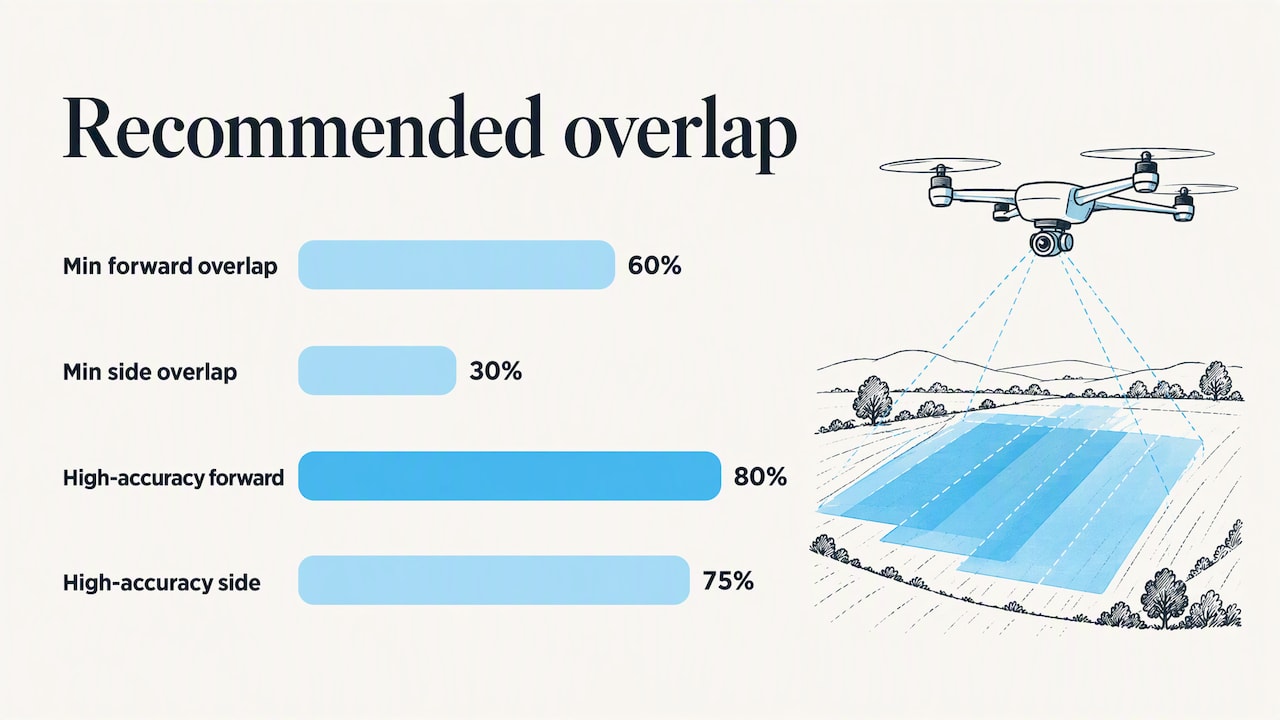
- For mapping, published guidance sets a minimum of 60 percent forward and 30 percent side overlap. It recommends 80 and 75 percent for high-accuracy terrain models.
- Scheduling and delivery belong in the same workflow as the flight itself. A plan that ends at landing leaves the client waiting.
- Recurring sites are easiest when each flight is stored by property, site and date, so captures can be compared over time.
Table of Contents
- Do you need a flight plan for a drone?
- What a commercial drone flight plan includes
- Overlap, altitude and coverage settings
- Scheduling drone missions around weather, access and crews
- A drone flight scheduling workflow from plan to delivery
- Free flight planning tools: what to look for
- Our perspective: the plan should follow the data
- Turn your flight plan into a client deliverable
- Common planning mistakes to avoid
- FAQ
- Sources
Do you need a flight plan for a drone?
It depends on what you mean by “flight plan.” Two different things get that name.
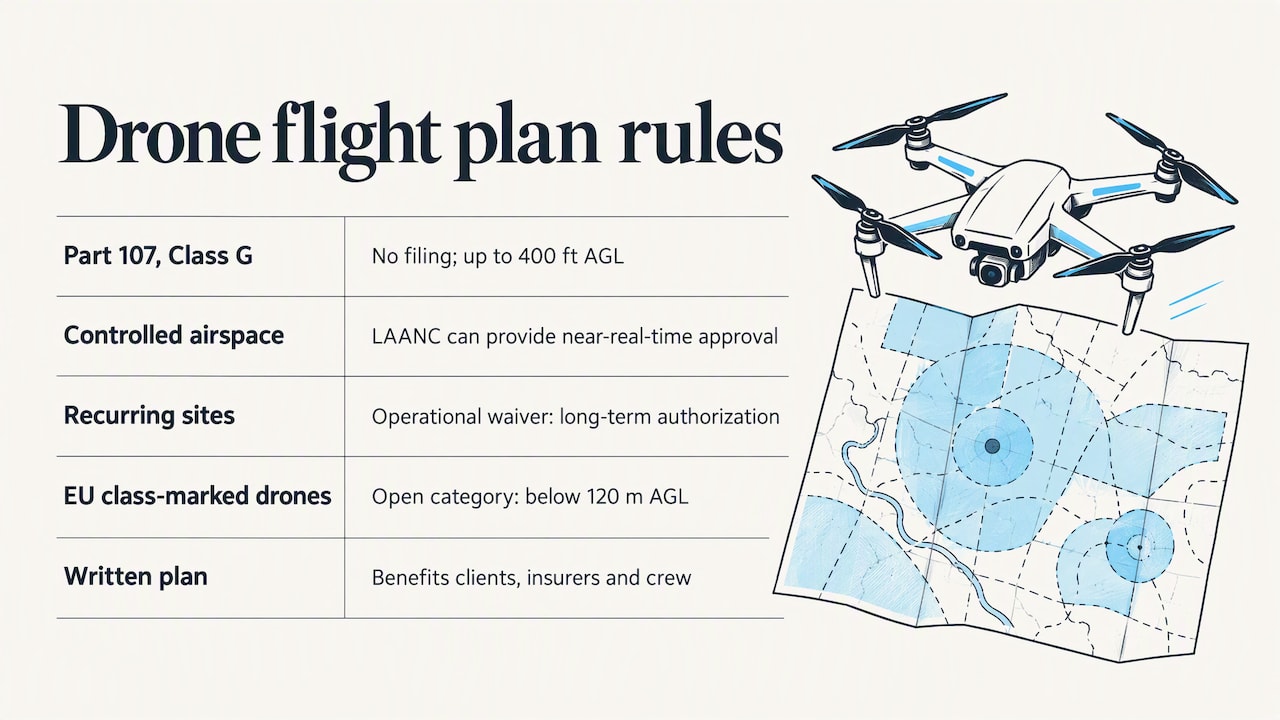
A filed flight plan is the manned-aircraft kind, submitted to air traffic services. Small drone pilots under Part 107 don’t file one. The FAA’s Aeronautical Information Manual says that remote pilots may fly in Class G airspace up to 400 feet AGL without prior coordination with ATC, and also within 400 feet of a structure.
An airspace authorization is required when the site sits in controlled airspace, such as near an airport. Part 107 pilots can use LAANC to get near-real-time authorization within UAS Facility Map altitudes. The FAA describes LAANC as automated: requests are checked against facility maps, TFRs and NOTAMs, and approvals can arrive in near-real time.
If you fly the same controlled-airspace location often, there is another route. Operators holding an operational waiver can apply for long-term authorization for locations with a UAS Facility Map where they work regularly.
Outside the U.S., the rules differ. In the EU, open-category operations with class-marked drones must stay below 120 meters above ground level. Always check your own country’s aviation authority before you plan.
The practical answer for professionals: you don’t need a filed plan, but you do need a written one. Clients, insurers and your own crew all benefit from it.
What a commercial drone flight plan includes
A plan for a construction, inspection or property job has two layers. The first is safety and legality. The second is data quality. Skipping either one costs you a reflight.
Safety and airspace
NOAA’s field job aid for drone response work tells crews to plan while still connected to the internet. It lists the checks: airspace restrictions, TFRs, NOTAMs, authorization needs, aircraft wind and temperature limits, and precipitation. It also recommends caching maps for offline use, because many job sites have poor coverage.
Write down:
- The airspace class and any authorization number
- Takeoff and landing points, and a backup landing point
- Obstacles, power lines and people-heavy areas around the site
- The pilot in command, visual observer if used, and who talks to the site contact
- Battery count, spare props and storage cards
Data quality
This is where mapping plans differ from casual flying. A repeatable plan includes a site boundary, ground control plan, sensor parameters, overlap, flight altitude, terrain awareness and margin. Aerotas describes standardized flight planning as repeatable workflows with those same elements.
Penn State’s geospatial course frames the order well: decide imagery scale or resolution and required accuracy first, then plan the photography and ground control. Altitude follows from the resolution you need, not the other way around.
Overlap, altitude and coverage settings
Overlap is the setting that most often decides whether a processed model comes out clean.
A World Bank-backed mapping report recommends a minimum forward overlap of 60 percent and side overlap of 30 percent. For high-accuracy terrain modeling it recommends 80 percent forward and 75 percent side. The same report advises adding extra flight lines outside the area of interest to cover the perimeter and reduce reconstruction errors.
| Mission type | Overlap approach | Why |
|---|---|---|
| Quick progress photos | Lower overlap, fewer passes | Visual record only, no measurement |
| Orthomosaic for markup | Report minimum or a bit higher | Clean stitching, shorter flight |
| Stockpile or grading volumes | High overlap, ground control | Surface accuracy drives the number |
| Point cloud or 3D model | Highest overlap, plus extra lines past the boundary | Edges reconstruct poorly without margin |
The table is a planning aid, not a rule. Use the overlap your accuracy target and your processing workflow call for.
Two more settings to lock in:
- Altitude over uneven terrain. Elevation changes shift your real overlap. Use terrain-following in your planning tool or adjust the altitude, then verify on a test pass.
- Ground control. KOREC’s 2026 mapping guide says control points should appear in at least eight to ten images from varied angles. Place them where the work matters, not only at the corners.
Scheduling drone missions around weather, access and crews
A plan on paper still has to fit a calendar. Mission scheduling is mostly about removing surprises.
Weather and light. Mapping guidance suggests collecting data between 10 a.m. and 2 p.m. in clear weather to limit shadows and haze. Check wind and cloud cover on the forecast, and keep a backup day.
Site access. Confirm gate hours, escorts, safety orientation and landowner permission before the day. On active construction sites, ask what equipment will be staged where, since stockpiles and haul routes change weekly.
Airspace. If you need authorization, request it as part of scheduling and not at the gate.
Crew and equipment. Assign the pilot, confirm battery health, and make sure storage cards are formatted and labeled.
Deadlines. Work backward from when the client needs the deliverable. Flight, processing and review each take time, so the flight date is earlier than most people expect.
For recurring work, such as monthly progress captures on a build or quarterly roof checks across a property portfolio, set the cadence once. Fly at similar times of day, with similar settings, so differences between captures reflect the site and not the conditions.
A drone flight scheduling workflow from plan to delivery
The most useful plan treats the flight as one step. Texas DOT’s UAS mapping specification lays out the full chain: define coverage and planning parameters, establish survey control, acquire data, review and process, extract features, run QA/QC, and deliver orthoimagery, reports and point clouds with metadata. You may not work to a state DOT spec, but the order holds up for any commercial job.
Here is a practical version:
- Scope the job. Define the area, the deliverables and the accuracy the client needs.
- Plan the mission. Set altitude, overlap, boundary, control and takeoff points.
- Clear airspace. Request authorization if the site is in controlled airspace.
- Schedule. Pick the weather window, confirm access and assign the crew.
- Fly and log. Record the flight, any deviations and conditions.
- Protect the data. NOAA’s job aid says to remove the storage card and back it up as soon as possible, and to download and back up flight tracks.
- Check before processing. Look for blur, exposure problems and unplanned or poor images. Confirm coordinate systems and geotags.
- Process and verify. KOREC advises reporting RMS error for control points, using independent checkpoints for absolute accuracy, and visually inspecting outputs for distortions and gaps before delivery.
- Deliver and archive. Put results where the client can open them without special software.
Steps 7 to 9 are where many small operators lose time. Files get emailed in pieces, links expire, and nobody can find last month’s flight.
Free flight planning tools: what to look for
Free planners exist, and for a single flight they can be enough. Look for these capabilities:
- Airspace status and LAANC access
- Weather forecasts, hourly and multi-day
- Checklists you can customize
- Terrain-aware routes and photogrammetry grids with overlap and altitude settings
- Offline map caching
- Export formats that work with your aircraft
Check the limits too. Some free planners cap route size or the number of exports per day. A planner also covers only the first half of the job. It plots the route, but it doesn’t organize the results, process them or deliver them. If you are comparing processing options, our free drone mapping software comparison covers what each approach does and doesn’t handle, and our page on drone mapping software for Mac covers that platform.
Our perspective: the plan should follow the data
We build DataDelivery for the people who live with the output of a flight plan: drone service providers, construction firms and property managers. What we see is that most flight problems show up after the flight, not during it.
A plan that only lists waypoints leaves out the questions clients actually ask. Which site is this? What changed since last month? Can I measure this pile? Can my superintendent see it without installing anything? Those answers depend on how the data is organized, so we think the plan should name the property, the site, the capture date and the deliverables before the aircraft leaves the case.
That is why we organize everything by property, site and date, with map-based and timeline browsing, so recurring captures line up for comparison. It’s also why processing, orthomosaics, point clouds, annotations, measurements and reports live in the same place. You don’t need to pass files between separate image-processing tools. Clients receive their data under your brand, without per-seat fees or required client accounts.
Our advice: standardize the plan, then standardize the delivery. When both are repeatable, scheduling gets simpler, reports get faster and clients stop asking where the files are.
— User
Turn your flight plan into a client deliverable
Once the flight is done, DataDelivery handles the rest of the workflow: processing, viewing, measuring, annotating and sharing. You can start on the free plan at $0 per month and move up as your job count, processing runs and storage grow. Paid plans run from Starter at $12.99 per month ($129 per year) and Basic at $29.99 per month ($299.99 per year), to Premium at $79.99 per month ($799.99 per year) and Enterprise at $199.99 per month ($1,999.99 per year). See the full limits on our pricing page.
If you’d rather not fly the site yourself, we also offer turnkey aerial capture through the online portal. For construction teams, our turnkey aerial data for construction shows how capture and delivery fit together. Property managers can see how aerial inspections and monitoring work across a portfolio.
To see how a job is set up, read our guide to creating and organizing jobs. For the delivery side, see how to share drone data with clients.
Common planning mistakes to avoid
- Planning from the aircraft, not the deliverable. Decide what the client needs to measure or see, then work back to altitude and overlap.
- Flying the exact boundary. Without extra lines past the edge, perimeters reconstruct poorly.
- Ignoring terrain. Slopes and cut-and-fill areas change your effective overlap.
- Changing settings between visits. Time-series comparison only works when captures are consistent. Aerotas puts it plainly: a good plan should be boring on purpose.
- Leaving authorization to the last minute. Controlled airspace needs lead time in your schedule, even when LAANC is quick.
- Skipping data checks. Blur and bad exposure are far cheaper to catch on site than a week later.
- Delivering in pieces. Zip files and expiring links make clients hunt for data. A single organized portal does not.
FAQ
Do you need a flight plan for a drone?
Not a filed one, for most small drone flights under Part 107 in the U.S. You do need airspace authorization, typically through LAANC, if the site is in controlled airspace. A written internal plan is still the professional standard.
How do you make a drone flight plan for mapping?
Start with the deliverable and required accuracy. Then set the site boundary, altitude, overlap and ground control, check airspace and weather, and schedule the crew and access. Add extra flight lines past the boundary and finish with a data check before you leave.
Is there a free drone flight planner?
Yes, several free planners cover airspace checks, weather and basic mission routes. Check their limits on route size and exports. They plan the flight but don’t process, organize or deliver the data afterward.
How far ahead should you schedule a drone mission?
Build in buffer. Confirm site access and crew early, request airspace authorization before the day, and keep a backup weather date. For recurring captures, set a fixed cadence and similar conditions each time.
Sources
- FAA Aeronautical Information Manual, Chapter 11, Unmanned Aircraft Systems
- FAA, UAS Data Exchange (LAANC)
- FAA, Wide Area Airspace Authorization guide
- EASA, Open Category, Low Risk Civil Drones
- NOAA, Uncrewed Aircraft Systems Hurricane Response Job Aid
- Penn State GEOG 892, Designing a Flight Route
- GFDRR, Small Island Mapping with UAVs
- TxDOT, UAS Aerial Mapping Specifications and Workflow
- Aerotas, Flight Planning
- KOREC, UAV 3D Mapping: From Raw Data to Deliverables