A Dropbox Alternative for Drone Service Providers
Dropbox is built for file sharing, not for client-ready drone deliverables. DataDelivery keeps your photos, video, maps and point clouds in one job that your client opens in a browser, with nothing to install.
Free plan, no credit card required.
When Dropbox is the right tool
Dropbox is good at what it was built for. Keep using it if these matter most to you:
- Sync. Dropbox keeps folders in sync between your computers and your phone, with desktop and mobile access on its paid plans.
- 3D model previews. On its Professional, Standard, Advanced, Business and Business Plus plans, Dropbox previews common 3D files such as OBJ, PLY, STL and GLB. Basic and Plus do not include this.
- Branded transfers. Standard and Advanced add branded transfers with a password and a custom expiry date. Plus does not.
- A few stills. For a handful of photos sent once, any file-sharing tool works fine.
The difference shows up when you deliver. Dropbox shares files and folders. DataDelivery shares a job: photos, video, maps and point clouds that open in viewers made for drone data.
What your client sees
Dropbox, WeTransfer and Google Drive details checked on on each vendor's own pricing and help pages.
In Dropbox
Dropbox's help center lists these preview limits for paid accounts:
- JPG and PNG photos preview up to 100 MB or 50 megapixels.
- TIFF files preview up to 200 MB or 50 megapixels. Files over these limits do not preview.
- GeoTIFF, LAS and LAZ are not in Dropbox's list of file types that preview. A .tif orthomosaic previews only as a plain image.
In DataDelivery
- Orthomosaics open on an interactive map in the browser: pan, zoom, swap the basemap and fade the overlay.
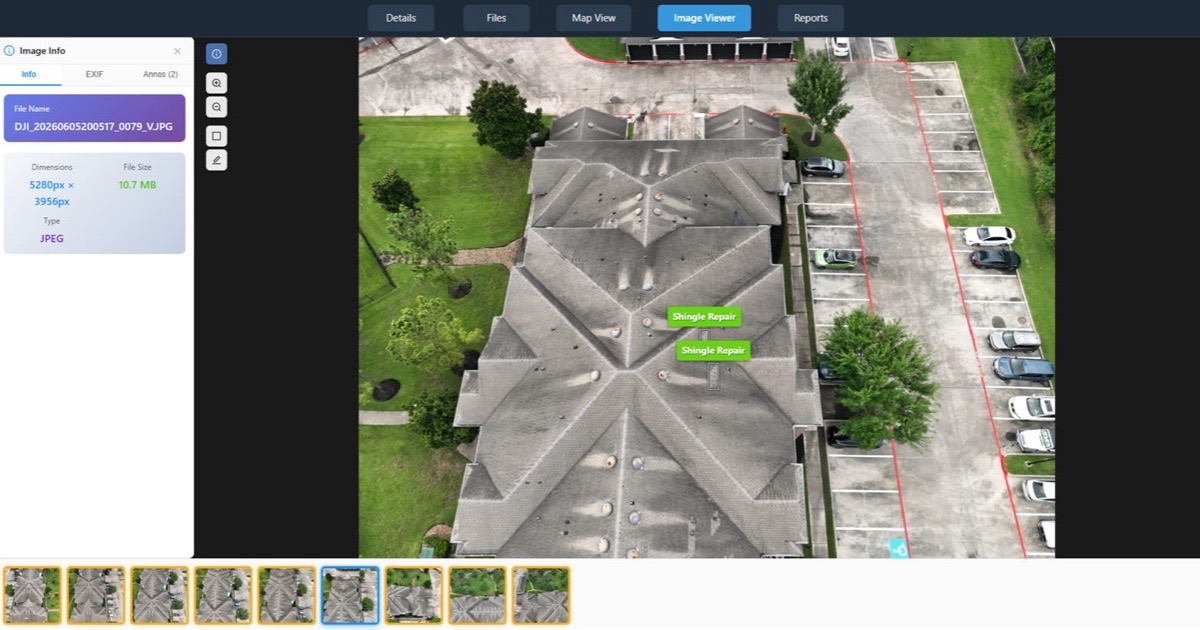
- Full-resolution drone photos open in a deep-zoom viewer that streams tiles, so clients can zoom to full detail without downloading the original.
- 360 drone panoramas are detected automatically and open in a look-around viewer.
- Drone videos play inside the job for common formats such as MP4 (H.264). HEVC (H.265) files play where the viewer's browser supports them.
- 3D point clouds open in the browser, so clients can orbit and zoom through the site.
No-login links are view-only by default; invited clients you add to a job can download the files you allow. You decide per link whether point clouds are included, and they start switched off.
A WeTransfer alternative for drone footage
WeTransfer is quick for a one-off send, and your recipient does not need an account. On the Free and Starter plans, though, a transfer lasts up to 3 days, so the client has to save everything before it expires.
- Free: for individual, non-commercial use only. Up to 3 GB and 10 transfers a month, and each transfer lasts up to 3 days.
- Starter: 300 GB and 10 transfers a month. Transfers last up to 3 days. For individual use only.
- Ultimate: no transfer size limit, unlimited transfers, no limit on how long a transfer lasts, and custom branding per transfer. For individual use only.
WeTransfer prices as of : Starter is $10 a month billed monthly, or $7 a month billed yearly. Ultimate is $25 a month billed monthly, or $19 a month billed yearly.
With DataDelivery, the job stays in one place. Invite your client by email, or send a no-login link, including on the Free plan. Public links expire after 90 days by default, and you can move the date or revoke the link at any time.
A note on Google Drive
Google Drive's help page lists the file types it can preview: common images (including TIFF, shown as a scaled-down version), documents, video and audio. It lists no LAS or LAZ point cloud formats and no 3D model formats, and it says nothing about showing files on a map.
Dropbox vs DataDelivery for drone deliverables
| What you need | Dropbox | DataDelivery |
|---|---|---|
| Drone photos | JPG and PNG preview up to 100 MB or 50 megapixels (TIFF up to 200 MB) | Deep-zoom viewer that streams full-resolution photos, with a photo-info (EXIF) panel |
| Orthomosaics (GeoTIFF) | Not in the preview list. A .tif previews only as a plain image | Open on an interactive map: pan, zoom, swap the basemap and fade the overlay |
| Point clouds (LAS/LAZ) | Not in the preview list | Open in a 3D viewer in the browser |
| 3D models | Previews OBJ, PLY, STL, GLB and other 3D files on Professional, Standard, Advanced, Business and Business Plus | 3D point clouds open in the browser, with nothing to install |
| Syncing files | Syncs folders between your computers and your phone | Upload files and whole folders from the browser, with your folder structure kept. No sync with Dropbox, Google Drive or OneDrive |
| Your branding | Branded transfers with a password and custom expiry on Standard and Advanced | Your logo from the Basic plan. Your own domain, and no Powered by DataDelivery link, on Premium and Enterprise |
| Price to start | Basic: free, 2 GB. Plus: $11.99 a month, or $9.99 a month billed yearly, with 2 TB | Free plan: 25 GB and 1 processing run a day, no credit card. See the pricing page for paid plans |
Keep Dropbox for sync. Use DataDelivery for delivery.
You do not have to pick one. Keep working files and backups in Dropbox. When a job is ready for the client, upload the finished photos, video and maps to a DataDelivery job.
DataDelivery does not import from Dropbox, Google Drive or OneDrive. You upload from your browser: drag in single files, large batches or whole folders, with your folder structure kept. Uploads retry automatically on network errors.
Each job holds multiple dated site visits on a timeline, so recurring work for the same site stays in one place.
Your data is never locked in. You can download original files at full resolution, folders as ZIPs, point clouds as LAZ and map layers as GeoJSON.
From upload to client link in four steps
1. Create a job
Set up one job for the site. A job can hold more than one dated site visit.
2. Upload
Drag in photos, video and whole folders from your browser. If an upload is interrupted, re-select the same folder and files already uploaded are skipped.
3. Add maps
Let NDS Processing turn overlapping drone photos into map products, or add finished orthomosaics, elevation models and point clouds (.tif, .tiff, .las, .laz) through Add External Products.
4. Share and track
Invite your client by email, or send a no-login link, including on the Free plan. See what each invited client opened and downloaded.
DataDelivery has a Free plan with no credit card. Paid plans add more jobs, captures and storage, and higher plans add more processing runs a day. See current DataDelivery plans
Dropbox alternative: common questions
Can I import files from Dropbox into DataDelivery?
No. DataDelivery does not connect to Dropbox, Google Drive or OneDrive. Upload from your browser instead: drag in single files, large batches or whole folders, and your folder structure is kept.
Does my client need an account to see the files?
No. You can send a no-login link, including on the Free plan. Anyone with it can view the job's files, maps and imagery in a browser, with nothing to install. If you invite a client by email instead, new recipients get a free account and a link to set their password.
Can clients download the original files?
Invited clients can, when their access includes downloads. The Viewer preset, for example, allows view and download. They can download single files, whole folders or selections, and big folders are zipped in the background with an email when the ZIP is ready. No-login links are view-only by default.
How long does a no-login link last?
Public links expire after 90 days by default, and you can move the date. You can see how many times each link was opened and revoke it at any time.
Can I put my own logo on what the client sees?
Yes. Starting on the Basic plan, your logo appears on client-facing pages and emails. On Premium and Enterprise you can also deliver from your own address, such as portal.yourcompany.com, and the small Powered by DataDelivery link is removed.
Does DataDelivery replace Dropbox?
Not for syncing files between your computers. It replaces the delivery step: one job with your photos, video, maps and point clouds that your client opens in a browser.
Related
Send your next job as a link, not a folder
Free plan, no credit card required.
Competitor features and pricing were last reviewed on October 7, 2026 using publicly available vendor documentation. Product details may change. DataDelivery and National Drone Services are not affiliated with or endorsed by Dropbox, WeTransfer or Google. Dropbox, WeTransfer and Google Drive are trademarks of their respective owners. Where a vendor's pricing is quote-based or tier-specific, we list "contact the vendor" rather than estimate a figure.
Sources
- Dropbox Help: file types that preview on Dropbox, checked October 7, 2026
- Dropbox plans and pricing, checked October 7, 2026
- WeTransfer pricing, checked October 7, 2026
- Google Drive Help: files you can store in Google Drive, checked October 7, 2026