Deliver Your Drone Inspection Photos to Clients
You fly the roof or site and review the photos. Then give your client the photos from your inspections, your annotations and a report they can open in a browser, with nothing to install.
Free plan, no credit card required.
The short answer
You fly the job, review the photos and mark what you found. Your client opens the photos, your notes and the report in a browser, from one link.
In DataDelivery, that means deep-zoom photos, each photo placed on a map, your own annotations, a web report and a PDF Site Report, all from the same job.
What your client sees
- Deep-zoom photos. Full-resolution drone photos open in a deep-zoom viewer that streams tiles, so clients can zoom to full detail without downloading the original. It has a thumbnail strip, preloading of the next photos and a photo-info (EXIF) panel. Invited clients you add to a job can download the photos you allow.
- Each photo on the map. DataDelivery reads the GPS data already in your drone photos to place each image on the map. Map View puts every deliverable in place: overlay one or more orthomosaics by site visit and see where each photo was taken, with hover previews.
- Camera heading for DJI photos. For DJI photos, the photo viewer shows the camera heading and gimbal angle from the photo's metadata.
- 360 panoramas and video. 360 drone panoramas open in a look-around viewer. Drone videos play right inside the job for common formats such as MP4. MP4 (H.264) plays in the browser; HEVC files play where the viewer's browser supports them.
Mark up what you found
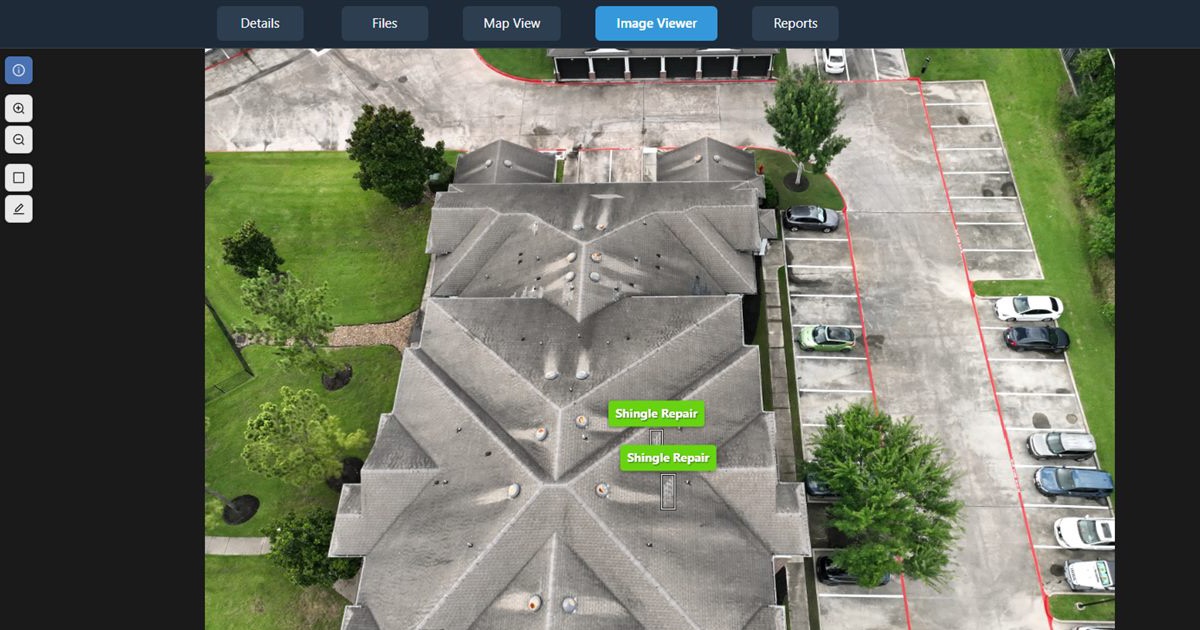
You review your inspection photos and draw your own annotations.
- Mark up drone photos with rectangle or polygon annotations, each with a name, description and a 1 to 10 severity.
- Reuse common labels from your annotation glossary, so the same issue gets the same name on every job.
- Add annotated photos to a web report or a PDF Site Report for the visit (see below).
Show your findings on a 3D model
- 3D point clouds open in the browser, where clients orbit and zoom through the site.
- On point clouds made by NDS Processing, annotations drawn on photos are projected onto the 3D point cloud, and camera positions can be shown in 3D so a client can jump from the model to the exact photo.
- Measure distance, height, area and angle inside the point cloud, with measurements saved to the job.
More on 3D delivery: share point clouds with clients.
Roof work: what to deliver after a roof flight
Clients who order roof inspections from you usually want to know what is wrong, where it is and how serious it is. A delivery that answers all three can include:
- Deep-zoom photos of the roof, so your client can zoom to full detail without downloading the originals.
- Your annotations on the problems you found, each with a name, description and a 1 to 10 severity.
- Each photo placed on the map where it was taken.
- Matched before and after photos from repeat visits, when you fly repeatable shots. Clients you invite by email can compare them too.
- Approximate distance, area and perimeter measured on the map over your orthomosaic, with area in square meters, hectares and acres.
- A web report and a PDF Site Report for the visit.
Measurements are approximate and are not a substitute for a licensed surveyor.
Hand over a report
A web report with its own link
Build interactive web reports from a job's data, choosing and ordering sections such as image comparisons, 2D measurements, annotated imagery, imagery, videos, 360 panoramas, 360 tours, point cloud, stockpiles and custom text. You build the report yourself.
Share any report you build as its own no-login link, and switch it off or revoke it whenever you want.
A PDF Site Report for one site visit
If a client expects a document after your inspection, generate a PDF Site Report for one site visit from the Reports tab: pick the visit and the annotations to include. The PDF has a cover, a site overview showing where the annotated photos were taken, measurement pages when that visit has saved measurements, and a page for each annotated photo with your markup and each annotation's name, description and severity.
The finished PDF is saved in the job's Reports folder. On your own jobs it carries your business name, your logo on plans that include logo branding, and a small "Powered by DataDelivery" line on the Free, Starter and Basic plans.
Your data is never locked in. Download original files at full resolution, folders as ZIPs, point clouds as LAZ, map layers as GeoJSON, and per-visit Site Reports as PDF. See how pilots use drone client reports.
Know the limits before you quote
DataDelivery is a delivery and review tool for your photos, maps and models. Three limits matter for roof and site work:
- No automated roof measurement reports (pitch or squares).
- No thermal or radiometric processing.
- Map area shows in square meters, hectares and acres, not square feet.
Delivering photos to clients: common questions
Can my client see where each photo was taken?
Yes. DataDelivery reads the GPS data already in your drone photos to place each image on the map. For DJI photos it also shows heading and gimbal angle. Map View puts every deliverable in place: overlay one or more orthomosaics by site visit and see where each photo was taken, with hover previews.
Does my client need an account?
No. Send a no-login link: anyone with it can view the job's files, maps and imagery in a browser, with no account and nothing to install, including on the Free plan. If you invite a client by email instead, they get a free account and a link to set their password.
Can I put my logo on the report?
Yes, starting on the Basic plan: put your own logo on client-facing pages and emails. On your own jobs, the PDF Site Report carries your business name, your logo on plans that include logo branding, and a small "Powered by DataDelivery" line on the Free, Starter and Basic plans.
Can I compare photos from two visits?
Yes, when you fly repeatable shots. For repeat visits, DataDelivery finds photos taken from the same spot and heading on different dates and shows them in a before and after slider. Clients you invite by email can use the same comparison.
Can I measure a roof?
You can take approximate measurements. Measure distance, area and perimeter on the map over your orthomosaic, with area in square meters, hectares and acres, or measure distance, height, area and angle inside a point cloud. There is no roof pitch tool and no automated roof measurement report (pitch or squares). Measurements are approximate and are not a substitute for a licensed surveyor.
Related
Deliver your next roof or site job with DataDelivery
Free plan, no credit card required.