How to Measure Stockpile Volume with a Drone
A drone stockpile volume is an estimate built from overlapping photos of the pile. This guide walks through the four steps, from the flight to the fill, cut and net volume, and shows how to hand the result to your client.
Free plan, no credit card required.
The short answer: four steps
- Fly the pile and the ground around it, collecting overlapping photos.
- Build a surface model (DSM) and an orthomosaic from the photos, or import ones you already have.
- Trace the base of the pile on the orthomosaic.
- Read the estimated fill, cut and net volume, then share the result with your client.
Results are estimates for inventory tracking, not surveyed quantities. The steps below explain each part, and the Measurements & Analysis guide shows the screens button by button.
What you need
- Overlapping drone photos of the pile. Standard overlapping JPG or PNG drone photos work, ideally from an automated mapping flight with 60 to 80 percent overlap.
- A surface model (DSM) and an orthomosaic. The volume is estimated from the DSM, and you trace the pile on the orthomosaic. A terrain model (DTM) alone is not enough.
- A place to trace and share the result. In DataDelivery, both happen in the same job as your photos and maps.
Step 1: Fly the pile for a surface model
The surface model can only show what the photos show. A few habits help:
- Fly an automated mapping pattern over the whole pile, with a margin of open ground on every side. The base is estimated from the ground along the edge you trace later, so that ground needs to be in the photos.
- Keep the overlap high. 60 to 80 percent between photos is a common target.
- Fly when the toe of the pile is clear. Trucks, loaders or another pile parked against the edge end up in the surface model.
- Pick steady light if you can. Deep shadows and glare can hide the shape of the pile.
- For a yard you measure every month, fly the same pattern each time, so the visits are easy to compare.
Step 2: Build or import a surface model
Process the photos with NDS Processing
NDS Processing turns overlapping drone photos into map products, with five goal presets: Default, Orthophoto / 2D Mapping, 3D Model, Buildings / Structures, and Terrain & Volumes. For a stockpile job, Terrain & Volumes is the preset to start with.
- Pick folders from one site visit, name the output, set a contour interval, draw a boundary to limit the processed area, and get an email when it finishes.
- Each run produces a stitched orthophoto, elevation models (DSM and DTM), a 3D point cloud, contour lines and a textured 3D model.
- Every plan, including Free, includes daily NDS Processing runs; higher plans include more.
For the processing screen step by step, see Processing Imagery in the user guide. See current DataDelivery plans.
Or import a surface model you already have
Already processed a flight in another program? Import a finished orthomosaic, DSM, DTM (GeoTIFF) and LAS/LAZ point cloud into a DataDelivery job. Each file is checked automatically, then it appears in the Products folder ready to view, measure and share. Import a DSM with your orthomosaic to run approximate stockpile estimates in the browser. See integrations and file imports.
Step 3: Trace the base of the pile
You trace the base of the pile on the orthomosaic. DataDelivery estimates the ground under the pile from the surface-model (DSM) heights along the line you traced. There is no manual base-plane setting.
- Trace the toe of the pile, where it meets the ground, not partway up the slope.
- Keep the line on open ground. If the line crosses a truck, a wall or the next pile, those heights become part of the estimated base.
- Follow the real shape of the pile with enough points around curves and corners.
Step 4: Read fill, cut and net volume
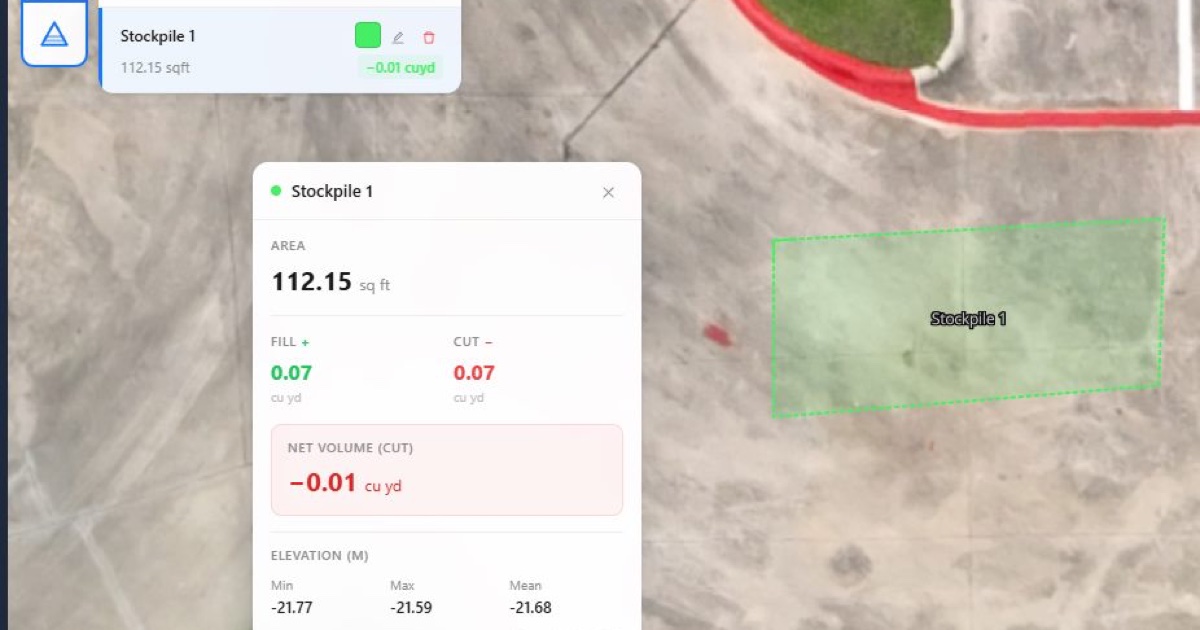
DataDelivery estimates fill, cut and net volume in cubic yards, the area, and the minimum, maximum and mean elevation. Results are estimates for inventory tracking, not surveyed quantities.
- Fill is material above the base, which is the number most stockpile work cares about.
- Cut is anything below the base, such as a dip or a hollow inside the outline.
- Net volume combines the two, fill minus cut.
The result stays saved in the job, and you can add it to a report. There is no export of stockpile results.
What changes a drone volume estimate
Two flights of the same pile rarely give exactly the same number. These are the usual reasons:
- Photo overlap and image quality
- Flying height and how much ground detail each photo holds
- How clearly the pile surface and its edges show (shadows, vehicles, equipment)
- How closely your trace follows the base of the pile
- Sloped or uneven ground around the pile
- Processing settings
Measurements are approximate and are not a substitute for a licensed surveyor.
Other ways to measure stockpiles
Vendor details checked on on each vendor's own site.
Stockpile Reports
An app built for measuring piles. Its pricing page lists:
- Personal: free, 1 user and 1 measurement a day, measured with an iPhone.
- Professional: $20 a month or $200 a year, 1 user and unlimited measurements, measured with an iPhone, with a 7-day free trial.
- Business plans for up to 10, 20 or 50 piles: $100, $200 or $500 a month, or $1,000, $2,000 or $5,000 a year, with unlimited users and measurements, iPhone measurement, a web application, reports in tonnage and a 7-day free trial.
- Business 200+: pricing on request, for 200 or more piles. This is the plan that lists measuring with drones.
Professional and the Business plans for 10, 20 and 50 piles are sold as App Store in-app purchases. If you mainly want quick iPhone measurements of freestanding piles and reports in tonnage, a single-purpose app like this can be the simpler choice.
Propeller
Built for earthworks: Propeller CAD design tools, AeroPoints ground points, and DirtMate machine guidance and telematics. If your work is earthworks and you need ground points and machine guidance, Propeller is built for that job.
DataDelivery
DataDelivery fits when you already fly the site and want the volume estimate, the maps and the photos in one job your client can open in a browser.
Measuring stockpile volume: common questions
Can you measure stockpile volume with a drone?
Yes, as an estimate. Fly the pile to collect overlapping photos, build a surface model (DSM) from them, trace the base of the pile on the orthomosaic, then read the fill, cut and net volume. Results are estimates for inventory tracking, not surveyed quantities.
How do you calculate stockpile volume from drone data?
You trace the base of the pile on the orthomosaic. DataDelivery estimates the ground under the pile from the surface-model (DSM) heights along the line you traced, then estimates fill, cut and net volume in cubic yards, the area, and the minimum, maximum and mean elevation.
Can I set the base plane myself?
No. There is no manual base-plane setting. The ground under the pile is estimated from the surface-model heights along the line you trace, so trace the edge where the pile meets the ground.
Can I use a surface model from other software?
Yes. Import a DSM with your orthomosaic to run approximate stockpile estimates in the browser. A DTM alone cannot run stockpiles. Each file is checked automatically, then it appears in the job's Products folder.
Can I export the stockpile result?
No. There is no export of stockpile results. The result stays saved in the job, and you can add it to a web report and share that report as its own no-login link.
Related
Estimate your next stockpile with DataDelivery
Free plan, no credit card required.
Vendor details were last reviewed on October 8, 2026 using publicly available vendor documentation. Product details may change. DataDelivery and National Drone Services are not affiliated with or endorsed by Stockpile Reports or Propeller. Product and company names are trademarks of their respective owners. Where a vendor's pricing is quote-based, we say to contact that vendor rather than estimate a figure.
Sources
- Stockpile Reports pricing, checked October 8, 2026
- Propeller, checked October 8, 2026