Remote property monitoring means keeping track of a property’s condition without standing on it every week. Security cameras handle live events. Drones and aerial imagery handle something different: how a site changes over weeks and months. This guide covers the aerial side, written for drone service providers, construction firms and property managers who need a dependable record of what changed, where and when.
TL;DR
- Cameras watch for events. Recurring aerial captures document change: construction progress, stockpile movement, erosion, encroachment and roof or grounds condition.
- Aerial imagery comes from aircraft, satellites or drones. Drones give the most detail on demand, but someone has to fly them.
- A monitoring program is only as good as its records. Organize every capture by property, site and date, and name each capture’s purpose.
- Compare like with like: the same viewpoints, the same flight plan and consistent ground control.
- We built DataDelivery™ to hold, compare and deliver that history under your own brand, with no per-seat fees and no client accounts required.
Table of Contents
- What remote property monitoring means with aerial data
- Choosing the aerial source: drones, aircraft or satellites
- What a good monitoring record contains
- Capture consistently, or comparisons mean little
- How often should you capture?
- Organize records by property, site and date
- Compare, annotate and report
- Privacy, access and flight rules
- Our perspective: monitoring is a delivery problem as much as a flying problem
- Put it to work with DataDelivery™
- FAQ
- Sources
What remote property monitoring means with aerial data
Search for this topic and most results describe camera systems: live video, AI motion detection and monitoring centers. Those tools answer one question, “is someone on the property right now?”
Aerial monitoring answers another: “what is different since the last time we looked?” The Conservation Finance Network describes remote monitoring as applying imagery from planes, drones and satellites to detect landscape change over time, including unauthorized construction, logging, boundary encroachment and environmental changes. Land trusts use it to review easements from a desk. The same logic applies to a construction site, a vacant lot, a portfolio of rental buildings or a large campus.
That gives you a clear division of labor:
| Need | Cameras | Aerial captures |
|---|---|---|
| Live intrusion alerts | Strong fit | Not designed for it |
| Progress between visits | Limited to the camera’s view | Strong fit |
| Whole-site context | Narrow fields of view | Strong fit |
| Measurements (volumes, contours, area) | No | Yes, with the right processing |
| Long-term visual history | Footage is often overwritten | Dated, comparable records |
Many properties benefit from both. This article focuses on the second column because that is where drone data, and the way you organize it, makes the difference.
Choosing the aerial source: drones, aircraft or satellites
The Land Trust Alliance notes that aerial imagery can come from aircraft, satellites or drones, each with its own benefits and drawbacks. It compares them on coverage, resolution, timing, permission requirements and cost. That is a good checklist for any property.
A few practical differences stand out:
- Satellites cover wide areas. The Land Trust Alliance points out that satellite images are always georeferenced and can have property boundaries overlaid. The tradeoff is timing: imagery may not be taken when you need it, and boundaries may be inaccurate.
- Fixed-wing aircraft can provide detailed vertical and oblique imagery, according to EagleView’s buyer’s guide, while satellites generally offer lower-resolution top-down views.
- Drones offer immediate, highly detailed capture, but the same guide notes they normally require someone on site to deploy and operate them. The Land Trust Alliance adds that drone use involves FAA licensure, training and permission from the landowner and potentially neighbors.
For a single property that changes quickly, such as an active job site, a drone on a regular schedule is usually the best fit. For a wide rural holding that changes slowly, satellites may be enough between occasional drone flights. If you do not have a pilot on staff, a turnkey capture service removes the “someone has to be there” problem. We offer Turnkey Capture for exactly that case.
What a good monitoring record contains
A folder full of photos is not a monitoring record. A record lets someone who was not there answer three questions: what is this, when was it taken, and how does it compare to before.
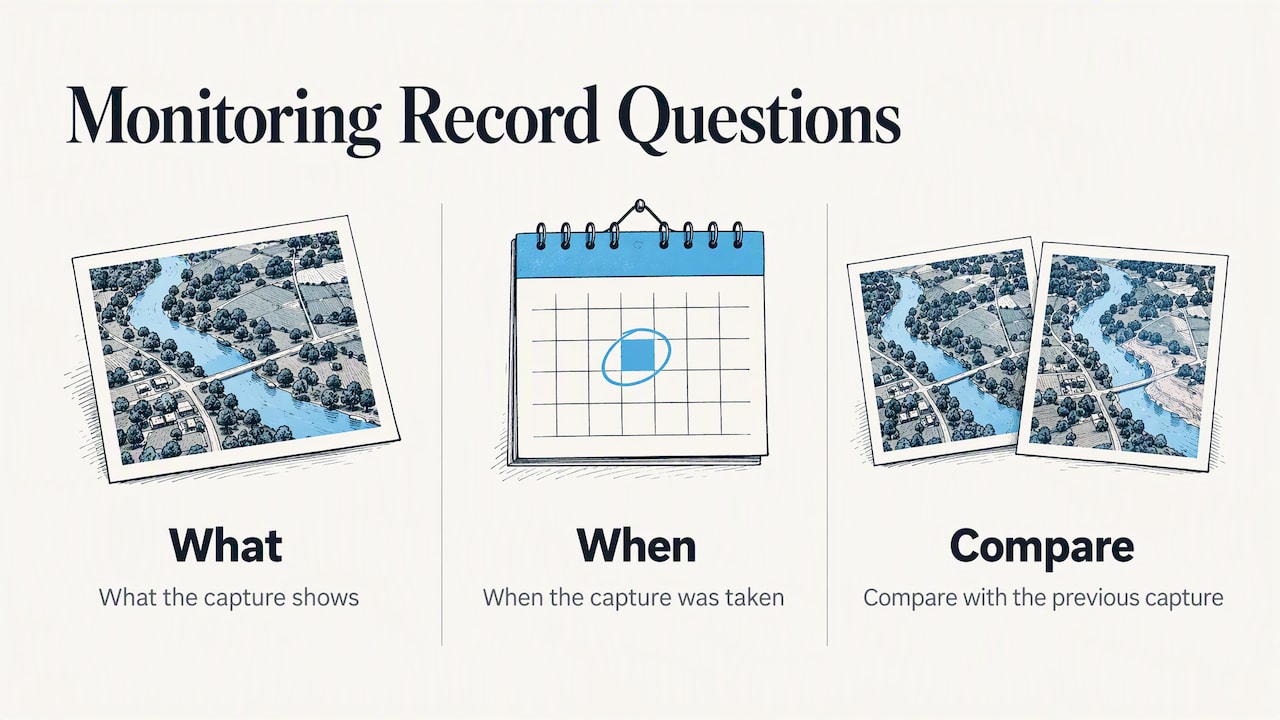
Orthomosaics for the big picture
An orthomosaic is a stitched, map-accurate image of the site. It is the working surface for most comparisons because it lines up with the same coordinates each time. Property managers use it to see roofs, parking lots and drainage. Contractors use it to check progress against plans. If you need to deliver one, our guide on sharing orthomosaics with clients walks through the options.
Point clouds and 3D models for measurement
Point clouds and 3D models add height. They support stockpile volumes, contour checks and cut-and-fill review. Clients often cannot open these files, so a browser viewer matters more than the raw file. See how that works in sharing point clouds with clients, and for stockpile work, stockpile measurement and client reporting.
Close-up photos for condition
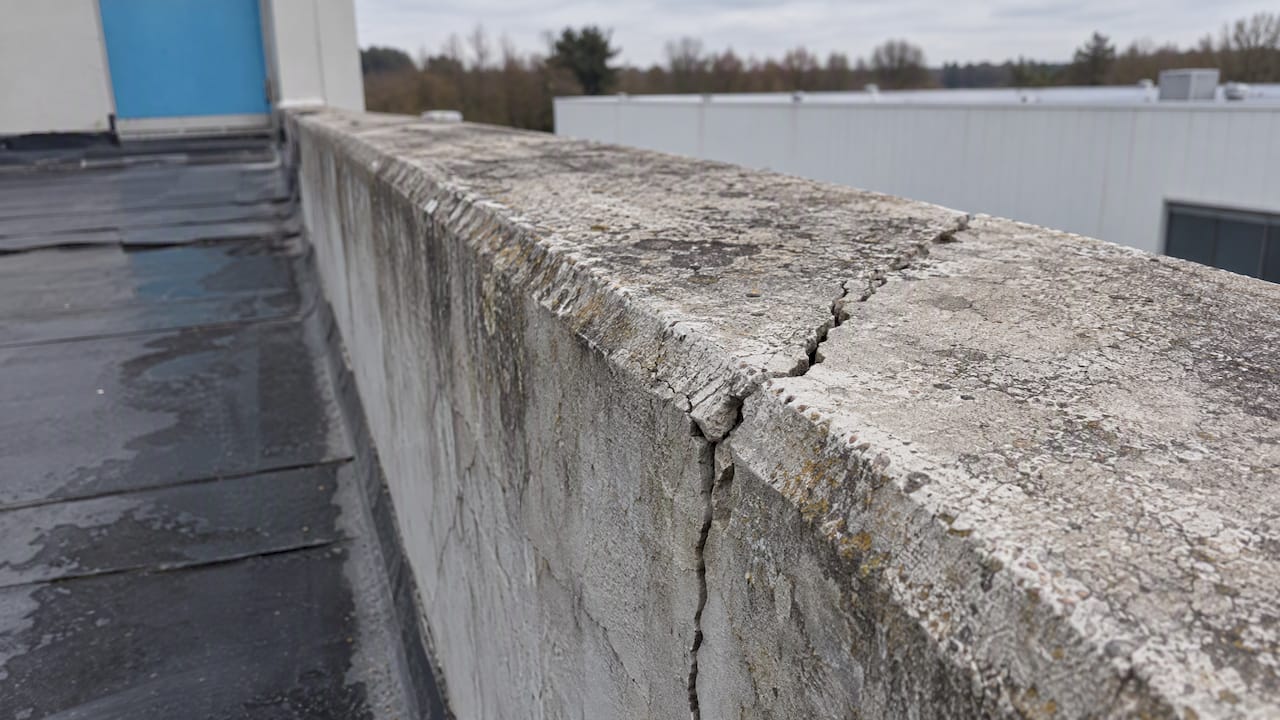
Obliques and detail shots answer questions an orthomosaic cannot: a cracked parapet, a clogged gutter, a damaged fence line. Tie each photo to a map position and a date so it does not float free of context.
Annotations and notes
A finding that lives in someone’s inbox gets lost. Pin it to the map where it was found. Note who flagged it, what it looks like and what should happen next. When the next capture arrives, you can check whether the issue was fixed.
Capture consistently, or comparisons mean little
Change detection only works when the two captures are comparable. Three habits make that happen.
Repeat the flight plan
Use the same altitude, overlap, camera settings and viewpoints each visit. Fly Maxwell recommends naming viewpoints and defining the purpose of each capture session so the history is readable by people who join later, without reverse-engineering flight files. We agree with that approach. A record named “North slope, pre-pour check” is more useful than one named after a file number.
Control your accuracy
How precisely captures line up depends on ground control. A study of UAV blocks oriented with different methods found that using at least one ground control point with GNSS-supported orientation gave geocoding accuracy almost as good as traditional ground control in the horizontal plane, and slightly worse vertically. The same paper, citing Benassi et al. (2017), reports that RTK-based solutions can reach 2 to 3 cm horizontal RMSE without ground control points, while vertical accuracy varies from 2 to 10 cm.
What that means for you: if you only need to see that a retaining wall has gone up, a lighter setup works. If you are reporting volumes or elevations to a client, fix permanent control points on site and reuse them every visit.
Know the limits of the method
Photogrammetry is not a substitute for a licensed survey in every situation. One academic comparison against total station results found photogrammetric products deviated by up to 50 cm at some points, yet the method was generally more useful because it saved significant data-collection time. Treat drone data as excellent for monitoring and progress, and say plainly where a survey-grade deliverable is required.
For change analysis, NatureScot’s UAV guidance says comparable classification steps are needed when comparing surveys over time, even if pixel-perfect overlap is not achieved. In short: consistent method matters more than perfect alignment.
How often should you capture?
There is no single right frequency. Let the rate of change set the schedule:
- Active construction: weekly or every two weeks is common, with extra captures before major pours, backfill or milestone billing.
- Stockpiles and earthwork: monthly, or at each inventory or pay-application date.
- Occupied properties and portfolios: quarterly, plus after storms or claims events.
- Vacant land and slow-changing sites: seasonally, with satellite imagery filling the gaps if it suits the need.
Weather will interrupt any plan. Keep the gaps visible. A published capture standard from one aerial provider shows a visit that was not flown as such, and a weather hold does not drop a visit from the record. That honesty helps clients trust the timeline. A missing month with a note beats a silent hole.
Organize records by property, site and date
The hardest part of recurring capture is rarely the flying. It is finding the right dataset six months later. A structure that scales looks like this:
- Property (the client’s asset or address)
- Site or area (building, phase, pad, parcel)
- Date and purpose (for example, “Monthly progress” or “Post-storm roof check”)
- Deliverables (orthomosaic, point cloud, 3D model, photos, report)
NatureScot’s guidance states that tracking progress over a project’s life requires standardized data levels, such as orthomosaics and surface models, and documented metadata so files stay usable. It also offers a metadata template covering fields like temporal extent and lineage. You do not need a government template, but you do need the habit: date, location, method and purpose on every capture.
The same discipline applies to the people side of monitoring. If your team also runs routine site checks, a digital logbook for site checks can keep inspection records, follow-up actions and supporting documents in one place beside your aerial history.
Compare, annotate and report
With consistent captures and clean records, the useful work begins.
- Compare over time. Open two dates on the same map and look for differences: new structures, changed grading, ponding, vegetation growth or vehicles and materials where they should not be.
- Measure. Check stockpile volumes and contour changes against the last capture.
- Annotate. Mark issues on the map and keep the thread attached to the location.
- Report. Package the findings so a client who never opens mapping software can still act on them.
The Conservation Finance Network reports a Maryland example in which remote monitoring of 58 properties averaged $54 per property and 0.8 staff hours, versus $202 and nearly 5 hours for in-person monitoring. Those figures come from one organization’s land-conservation program, so do not treat them as a benchmark for construction or property management. They do show the direction: reviewing imagery from a desk costs far less time than driving to every site.
Privacy, access and flight rules
Monitoring from the air touches people’s property and sometimes their image. Handle it deliberately.
- Permission. The Land Trust Alliance lists FAA licensure, training and landowner permission, possibly including neighbors, as requirements for drone use. Confirm the current FAA rules for your operation on the FAA’s official pages before you fly commercially.
- People in the frame. Under European rules, the Dutch data protection authority explains that capturing identifiable people with a drone calls for purpose limitation, data minimization and informing the people filmed. EASA also publishes a voluntary drone privacy code of conduct for professional operators. These are European requirements, not US law, but they are a sound baseline if you serve clients abroad or want a defensible policy at home. Check state and local privacy rules in the US.
- Access to results. Share data through links you can revoke, and give clients only the sites they own or manage.
Our perspective: monitoring is a delivery problem as much as a flying problem
Most drone providers we talk to can capture good data. Where projects stall is afterward: files too large to email, clients who cannot open a point cloud, and no easy way to show what changed between two visits.
We built DataDelivery™ around that gap. Generic file-sharing tools store files but do not understand sites, dates or maps. A monitoring program needs the opposite: map-based and timeline browsing, side-by-side comparison, annotations and reports, all organized by property, site and date. It should also work without separate image-processing software, and it should deliver under your brand rather than ours.
Two choices follow from how we think about this. First, we do not charge per seat, because a property manager should be able to include the whole team without a bill that grows with each person. Second, clients do not need accounts to view what you share, because a friction-free link is the difference between a report that gets read and one that does not.
Our advice to providers is simple: sell the history, not the flight. A client who can open a timeline and see eight months of progress understands the value of recurring service right away.
— the author
Put it to work with DataDelivery™
DataDelivery™ gives you one place to process, organize and deliver aerial data. You can browse by map or timeline, generate orthomosaics and point clouds, view 3D models, take stockpile and contour measurements, annotate findings, manage recurring captures and share branded client portals. It also integrates with DroneCRM and external mapping software.
Pricing is self-serve and based on usage limits for jobs, processing runs and storage. As published on our pricing page:
| Plan | Monthly | Yearly |
|---|---|---|
| FREE | $0 | n/a |
| Starter | $12.99 | $129 |
| Basic | $29.99 | $299.99 |
| Premium | $79.99 | $799.99 |
| Enterprise | $199.99 | $1,999.99 |
Start with the DataDelivery™ platform if you already fly. If you manage properties or construction and need the capture handled for you, look at our property management services or turnkey aerial data for construction. For client-facing reporting, see drone client portals and reports.
FAQ
Is remote property monitoring the same as a security camera system?
No. Camera systems watch for events in real time, such as intruders or a leak. Aerial monitoring documents how a property changes between visits, from construction progress to erosion or encroachment. Many owners use both for different jobs.
Can I monitor a property with drones if I do not fly?
Yes. Drones normally need someone on site to deploy and operate them, so the options are to hire a licensed pilot or use a turnkey capture service. Either way, the results can be delivered to you through a shared portal with no need to process the data yourself.
How accurate are drone captures for comparing dates?
It depends on your setup. Research on UAV blocks shows RTK-based solutions can reach 2 to 3 cm horizontal accuracy without ground control points, while vertical accuracy ranges from 2 to 10 cm. For volumes or elevations, use fixed ground control points and repeat them on every visit.
Do my clients need accounts to see the data?
Not with DataDelivery™. Shared data opens through a link under your branding, and we do not charge per-seat fees. You decide what each client can see.
Can I start for free?
Yes. We publish a FREE plan at $0 per month, and paid plans start at $12.99 per month. Compare limits on the pricing page.
Sources
- Types of remote monitoring, Land Trust Alliance
- Detecting Change in Conservation: The Value of Remote Sensing, Conservation Finance Network
- Aerial Imagery Buyer’s Guide and Checklist, EagleView
- Automated flights: repeat the plan, keep the judgment, Fly Maxwell
- Testing Accuracy and Repeatability of UAV Blocks Oriented with GNSS-supported Aerial Triangulation
- Assessment of photogrammetric mapping, Environmental Engineering and Management Journal
- UAV Deployment and Data Guidance, NatureScot
- Capture Standard v1.0
- Basic principles for the use of camera drones, Autoriteit Persoonsgegevens
- Code of Conduct, EASA
- Digital logbook for business checks, gribit