Roll, pitch, and yaw are the three ways a drone can rotate in the air. Roll tilts it left or right about the nose-to-tail axis. Pitch tips the nose up or down about the wingtip-to-wingtip axis. Yaw turns the nose left or right about the vertical axis. NASA’s beginner guide to aeronautics describes the same three motions around an aircraft’s center of gravity. Every flight plan, gimbal setting, and capture you deliver to a client rests on them.
If you fly or manage drone work, the terms matter beyond the textbook. They decide how you talk to pilots, how you read flight logs, and how you explain why a capture looks the way it does. We built DataDelivery™ to keep the results of those flights organized by property, site, and date, so this guide covers the motion first and then how it connects to your delivery workflow.
TL;DR
- Roll is a tilt about the front-to-back axis, pitch is nose up or down about the side-to-side axis, and yaw is a turn about the vertical axis.
- Pitch is the up-or-down movement. Yaw is the left-or-right turn of the nose.
- On a typical multirotor controller, the left stick handles yaw and throttle, and the right stick handles roll and pitch.
- Signs and directions change between coordinate conventions, so check which frame a log or SDK uses before you compare numbers.
- Organized, dated captures let you review every flight’s results over time. DataDelivery has a free plan at 0 $ per month.
Table of Contents
- The three axes in plain terms
- How to remember which is which
- Reading a roll, pitch, and yaw diagram
- How the sticks map to the rotations
- How a multirotor creates each rotation
- Why left and right can feel reversed
- Conventions: why the signs differ between logs and software
- Why this matters for delivering aerial data
- Put your captures in one place
- Our perspective on attitude and delivery
- FAQ
- Sources
The three axes in plain terms
Picture three lines passing through the drone and crossing at right angles at its center of gravity, the balance point of the aircraft. The Royal Canadian Air Cadets instructional guide states that all aircraft movement happens around that point. It also notes that an aircraft can rotate about one, two, or all three axes at the same time.
Those three lines are:
- Longitudinal axis, running nose to tail. Rotation about it is roll.
- Lateral axis, running wingtip to wingtip (on a quadcopter, side to side). Rotation about it is pitch.
- Vertical axis, running top to bottom. Rotation about it is yaw.
DJI’s Mobile SDK documentation says the same thing in its own terms: the body X, Y, and Z axes are renamed Roll, Pitch, and Yaw when describing rotation.
| Rotation | Axis | What the drone does | Quick picture |
|---|---|---|---|
| Roll | Longitudinal (nose to tail) | Banks left or right | One side drops, the other rises |
| Pitch | Lateral (side to side) | Nose goes up or down | Nodding “yes” |
| Yaw | Vertical | Nose swings left or right | Shaking your head “no” |
Is it pitch or yaw that moves the nose up and down?
Pitch. NASA Glenn’s guide defines a pitch motion as an up or down movement of the nose about the lateral axis. Yaw is the side-to-side swing of the nose about the vertical axis. If you only remember one thing, remember that yaw changes where the drone is pointing on a compass, while pitch changes how steeply it points toward the sky or ground.
How to remember which is which
The terms come from ships. The FAA Pilot Academy page on the axes of rotation notes that the names borrow from nautical terms for the same motions. It also pairs each rotation with a crewed-aircraft control: roll with the ailerons, pitch with the elevator, and yaw with the rudder.
Three memory hooks work well for new crew members:
- Roll is a barrel roll. The aircraft spins along its own length, like a log rolling.
- Pitch is a pitched roof. The slope goes up or down, so the nose does too.
- Yaw is a yard gate swinging. It turns flat around a vertical post, like a door on its hinge.
If you train pilots or field crews, a printed diagram with these three hooks beside each axis tends to stick better than a definition. Draw the aircraft from three views: from above for yaw, from the front for roll, and from the side for pitch.
Reading a roll, pitch, and yaw diagram
Most diagrams use one of two approaches. Some show the aircraft with three arrows through its center. Others show a flat 2D view for each rotation, with the axis pointing out of the page as a dot. Both show the same thing.
NASA’s version defines the axes geometrically. Yaw is perpendicular to the plane of the wings, pitch lies in the wing plane perpendicular to yaw, and roll runs along the fuselage toward the nose. The aircraft always rotates about its center of gravity.
When you look at any diagram, check three things:
- Which way is the nose? Many diagrams mark it with a different color or a camera icon.
- Which direction is positive? Arrows curving around an axis show the positive direction, and it varies by convention (more on this below).
- Is the view from above, the side, or the front? A top-down view hides pitch and roll entirely.
How the sticks map to the rotations
On a typical multirotor controller in the default mode, the Virginia Tech Drone Discovery pressbook gives this layout:
| Stick | Movement | Result |
|---|---|---|
| Left, left/right | Yaw | Clockwise or counterclockwise rotation |
| Left, up/down | Throttle | Altitude change |
| Right, left/right | Roll | Tilt and travel left or right |
| Right, forward/back | Pitch | Tilt and travel forward or backward |
This is the answer to the common search about throttle, yaw, pitch, and roll: throttle is the fourth control, and it raises or lowers the drone rather than rotating it. Some controllers let you swap the sticks, so confirm the mode on your own unit before a job.
How a multirotor creates each rotation
A quadcopter has no ailerons, elevator, or rudder. It changes attitude, meaning its orientation in space, by running its four motors at different speeds. The flight controller adjusts them continuously.
According to DJI’s documentation:
- To pitch forward, the back propellers spin faster than the front ones.
- To roll left, the right propellers spin faster than the left ones.
- To yaw, one set of clockwise propellers spins faster than the anti-clockwise set.
The STMicroelectronics STEVAL-DRONE01 manual explains the same principle. When all four motors spin at the same speed, the drone only hovers or moves up and down. When two diagonal motors spin faster than the other two, it rotates about its yaw axis. The manual adds that the flight controller compares measured Euler angles against target angles to set motor speeds.
That last point is why a drone can hold a steady hover for a mapping mission. The controller reads its own roll, pitch, and yaw many times per second and corrects any drift.
Why a tilt also moves the drone
Roll and pitch do more than lean the airframe. When a quadcopter tilts, its thrust splits into a horizontal part and a vertical part. Drone-Zoom’s explainer on how drones fly notes that the drone then travels opposite the horizontal component. The vertical part shrinks, so the flight controller raises all rotor thrusts to hold altitude. That is why a forward pitch command moves the drone forward and not just the nose.
Why left and right can feel reversed
DJI explains the reason for its orientation modes in the same documentation. When the aircraft faces the pilot, a left command makes it move to the pilot’s right. In default mode the commands are relative to the aircraft, not to you. DJI offers Course Lock and Home Lock modes that make movement relative to the pilot instead.
For new pilots on your team, this is the most common source of nervous first flights. Practice with the aircraft facing away from you before you try nose-in flying, and learn what each orientation mode does before using it on a site. If you are helping someone build toward a license, a guide to becoming a certified drone pilot covers the career path that follows from this stick fundamentals stage.
Conventions: why the signs differ between logs and software
If you compare flight logs, SDK values, or third-party software output, the numbers may not agree on sign. That is not an error. Different systems define the body frame differently.
The robotics textbook by Dellaert and Hutchinson, Introduction to Robotics and Perception, uses a forward-left-up body frame (x forward, y left, z up). With the right-hand rule, positive roll is to the right, positive pitch is downward, and positive yaw is toward the left. The book notes that these directions hold from an upright hover.
A different frame gives different signs. The fixtherobot.dev lesson on UAV coordinate frames lists four common right-handed frames:
- NED (North-East-Down), used by PX4 and aerospace for position and velocity.
- ENU (East-North-Up), used for ROS world frames.
- FRD (Forward-Right-Down), the PX4 body frame.
- FLU (Forward-Left-Up), the ROS body frame.
In NED and FRD with PX4’s angle definitions, the same page says roll is positive right-wing-down, pitch is positive nose-up, and yaw is clockwise from north.
DJI’s SDK documentation also warns that these angles can be unintuitive for developers. Rotating about the pitch axis moves the aircraft along the X axis, and a positive pitch angle moves it in the negative X direction.
Order matters when you combine rotations
Three numbers fully describe an aircraft’s attitude, but the order you apply them changes the result. Visualizing Rotations in 3D on av8n.com points out that 3D rotations do not commute: rotating about one axis and then another is not the same as doing it in reverse. The common yaw-pitch-roll (ZYX) order applies yaw first, then pitch, then roll. If you convert angles between tools, confirm the order each tool uses.
A practical checklist for any attitude data you receive:
- Note the frame (NED, ENU, FRD, or FLU).
- Note the rotation order.
- Note the units, degrees or radians.
- Check the sign of each angle against a known tilt before trusting a batch of values.
Why this matters for delivering aerial data
For service providers, construction teams, and property managers, roll, pitch, and yaw are not abstract. They show up in the data you hand over, and in the questions clients ask about it.
- Gimbal pitch sets whether a camera looks straight down or at an angle. Mapping passes and facade inspections use different settings, so the captures look very different even on the same site.
- Yaw sets heading. Two flights over the same site with a different heading can look unlike each other until they are placed on a map.
- Roll and pitch stability affect how steady an image set is, which matters when you compare a site week after week.
The real cost comes after the flight. Files from many sites and dates pile up, and clients want to know what changed. That is the problem DataDelivery is built for: aerial data organized by property, site, and date, with map-based browsing, timeline comparison, annotations, and reports. Teams that deliver this way spend less time explaining where a capture came from and more time on what it shows. Our guides on sharing drone data with clients and the map view show the workflow step by step.
Put your captures in one place
DataDelivery gives drone service providers, construction firms, and property managers a purpose-built home for aerial data. You browse by map or timeline, generate orthomosaics and point clouds, view 3D models, measure stockpiles and contours, annotate findings, and share them through client portals under your own brand. Our positioning is simple: no per-seat fees and no required client accounts.
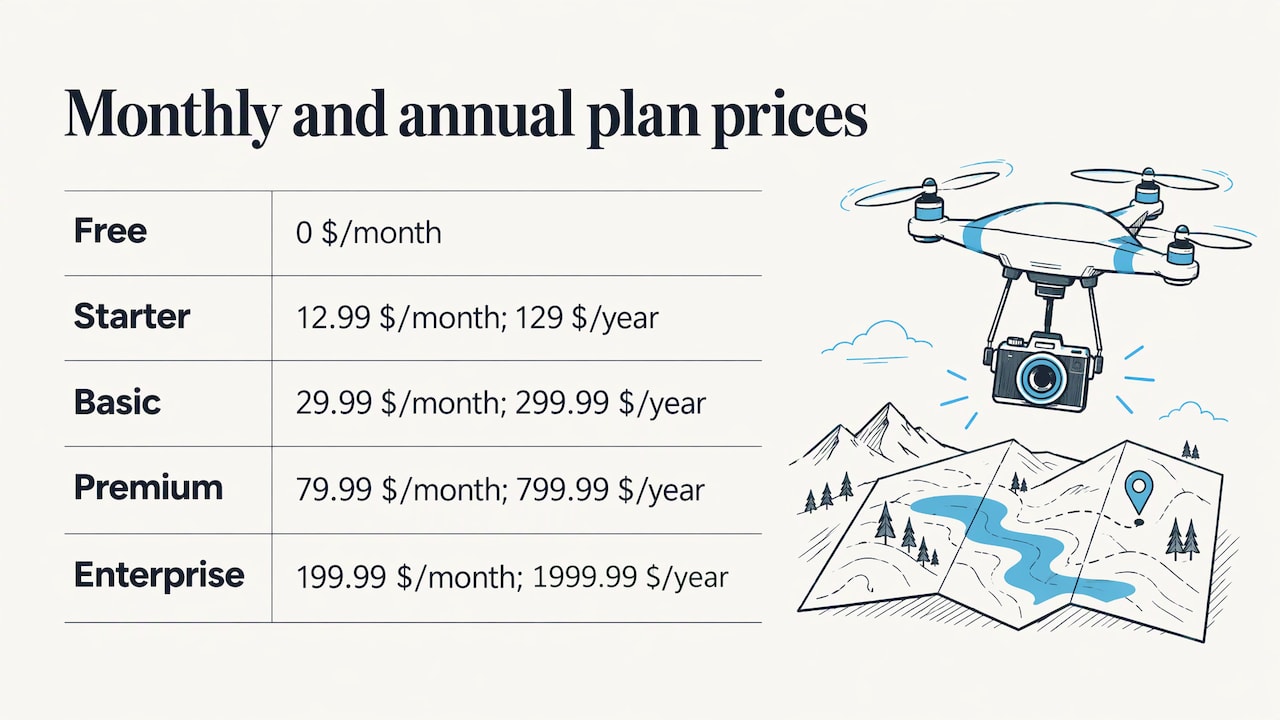
The pricing page lists a FREE plan at 0 $ per month. Paid plans are Starter at 12.99 $ per month (129 $ per year), Basic at 29.99 $ per month (299.99 $ per year), Premium at 79.99 $ per month (799.99 $ per year), and Enterprise at 199.99 $ per month (1999.99 $ per year). If you would rather not fly the site yourself, Turnkey Capture covers aerial data capture as a per-job service.

Crews that already fly can start on the DataDelivery platform and bring their first site in.
Our perspective on attitude and delivery
We think of roll, pitch, and yaw as the start of the data story, not the end of it. A pilot controls three rotations and a throttle. A client never sees any of that. They see a map, a model, or a before-and-after, and they want to know what changed on their site.
That is why we built DataDelivery around site and date rather than around files. When captures live under a property and a timeline, you can compare one flight to the next, add annotations where something needs attention, and send a report without asking the client to install anything.
We also built it so you do not need separate image processing software. Orthomosaics, point clouds, and 3D models are generated on the platform, and the results are delivered under your brand. For construction firms tracking progress and property managers keeping visual records, that means one place for the whole history of a site.
We would like to hear how your crews organize flights and what you want to see next.
the author
FAQ
How do I remember yaw, pitch, and roll?
Link each word to an everyday motion. Roll is a log rolling along its length, pitch is a nod up or down, and yaw is a door swinging on its hinge. The three axes also cross at right angles at the center of gravity, so you can picture them as three lines through the aircraft.
What are the three movements of an airplane or drone?
They are roll about the longitudinal axis, pitch about the lateral axis, and yaw about the vertical axis. The Royal Canadian Air Cadets guide notes that an aircraft can rotate about one, two, or all three at once. A quadcopter adds altitude, which it controls through motor speeds.
Is pitch or yaw up or down?
Pitch is up or down. It tips the nose up or down about the wingtip-to-wingtip axis. Yaw swings the nose left or right about the vertical axis.
What is throttle, yaw, pitch, and roll on a controller?
On a typical multirotor controller, the left stick controls yaw (left and right) and throttle (up and down). The right stick controls roll (left and right) and pitch (forward and back). Layouts can be changed on many controllers, so check your own mode before flying.
Sources
- Rotation - Control Axes, NASA Glenn Research Center
- Flight Control, DJI Mobile SDK Documentation
- Royal Canadian Air Cadets Proficiency Level Two instructional guide
- The three axes of rotation, FAA Pilot Academy
- Get Control of the Controller, Drone Discovery (Virginia Tech)
- How to build your own mini-drone with the STEVAL-DRONE01, STMicroelectronics
- How do drones work and fly, Drone-Zoom
- Multi-rotor Aircraft, Introduction to Robotics and Perception
- UAV coordinate frames, fixtherobot.dev
- Visualizing Rotations in 3D, av8n.com
- Drone Pilot Career Opportunities guide