Thermal mapping turns overlapping infrared photos into one georeferenced map of surface temperature. Done well, it shows heat loss on a roof, a failing panel in a solar array or a wet patch under a membrane. Done badly, it produces a colorful picture with numbers nobody can trust. This guide covers how a drone thermal map is flown and processed, what limits its accuracy, and what a client should receive at the end.
The phrase also means something else. In pharmaceutical and cold-chain work, “thermal mapping” (or temperature mapping) means placing data loggers around a warehouse or cold room to see how temperature and humidity vary. We cover the aerial kind here: surface temperature measured from above.
TL;DR
- A drone thermal map is built by stitching thermal frames into a georeferenced temperature map, usually with a visible-light camera supplying the geometry.
- Timing and processing decide accuracy. Avoid solar noon on clear days, convert raw radiometric files properly, and expect sensor drift on long flights.
- A useful deliverable holds more than a picture: the numeric raster, a temperature scale, acquisition conditions, annotated anomalies and a method statement.
- Repeat captures only become useful when each date is stored the same way, so you can compare them side by side.
- Organizing, comparing and sharing those maps is where DataDelivery fits.
Table of Contents
- What thermal mapping with drones is, and what it is not
- Where thermal maps earn their keep
- When to fly: timing decides the result
- Flight settings that make a map stitch
- Keeping the temperatures: radiometric processing
- How accurate is a drone thermal map?
- What a thermal mapping deliverable should contain
- Comparing thermal maps over time
- Perspective: delivery is where thermal work usually breaks down
- Delivering thermal maps to clients with DataDelivery
- FAQ
- Sources
What thermal mapping with drones is, and what it is not
A thermal camera detects the heat that surfaces emit. Thermography is the practice of studying those heat signatures and putting the imagery to practical use. Utility inspections and monitoring crop heat exposure are two common drone uses.
Mapping adds geometry. A single thermal photo shows one view. A thermal map is made from many overlapping frames, so every pixel has a position on the ground and a temperature value. You can measure it, overlay it on a site plan and compare it with next month’s flight.
Two terms matter before you quote a job:
- Qualitative thermography shows relative heat patterns. It answers “which area is warmer than its surroundings?”
- Quantitative thermography gives more specific temperature measurements. It needs correct emissivity settings, calibration and careful processing.
Most client work starts qualitative and becomes quantitative only when someone has to act on a number. Know which one you are selling, because the accuracy burden is very different.
Where thermal maps earn their keep
The common uses are practical and repeatable:
- Roofs and building envelopes. Trapped moisture and missing insulation show up as temperature differences. Building facade heat leakage maps can be generated by fusing visible and thermal point clouds.
- Solar and utility assets. Hot components flag failures before they cause downtime. One Australian inspection firm reports that drone inspections can reduce fire risks and unplanned downtime by 63% and save 40 to 70% compared with manual inspections. Treat that as one provider’s figure, not a guarantee.
- Agriculture and forestry. Canopy temperature indicates plant stress. A maize study extracting canopy temperature from RGB and thermal imagery reached an R² of 0.94 against ground-truth readings.
- Geothermal and environmental surveys. In an Icelandic study, ignoring temperatures below a threshold revealed lineaments of geothermal importance.
For property managers and construction teams, the roof and envelope cases are the most frequent. Our pages on drone services for property management and aerial data for construction show how recurring site captures are usually organized.
When to fly: timing decides the result
Thermal data is only as good as the conditions it was captured in. Sun heats surfaces unevenly, and that can hide or fake the patterns you are looking for.
The ArcGIS Drone2Map documentation warns that flights around solar noon on a clear day can introduce false temperature values, while overcast conditions reduce solar effects on emissivity.
In practice, that points to a few habits:
- Fly in overcast conditions, or early morning, or after sunset, when solar loading is low.
- For building envelopes, you need a temperature difference between inside and outside. A mild day with no gradient hides leaks.
- Record wind, air temperature and cloud cover for every flight. You will need them in the report.
- Avoid flying just after rain unless moisture is the target.
Night and twilight flights
Pre-dawn and night flights give the cleanest thermal contrast, but in the US they come with rules. The FAA notes that flying at night or in civil twilight without anti-collision lighting requires a Part 107 waiver, and that applicants must explain how they will mitigate the added risk. Check the FAA’s current Part 107 requirements for your operation before you schedule a night job, and confirm what your pilot’s certificate and drone lighting cover.
Flight settings that make a map stitch
Thermal sensors have low resolution and little texture, which makes stitching harder than with a normal camera. Plan for overlap above all.
- Overlap. Esri’s guidance is that thermal flight plans should have at least 90% side and frontal overlap. That is far more than a typical RGB mapping flight.
- Dual capture. Fly a visible-light camera on the same mission. Thermal imagery typically lacks the texture and resolution for reliable independent reconstruction, so a robust approach is to reconstruct from RGB and project the thermal frames through the resulting camera model.
- Altitude. Lower flights give finer thermal pixels but need more images and more time in the air. Pick the altitude from the smallest anomaly you must see.
- Ground control. Use checkpoints if the client needs positional accuracy, and keep a record of them.
Keeping the temperatures: radiometric processing
This is the step that separates a map from a picture. Many drones save thermal frames as radiometric JPEGs (R-JPEGs) that hold raw temperature data. Standard photogrammetry software may treat them as ordinary visual images and discard the temperature values.
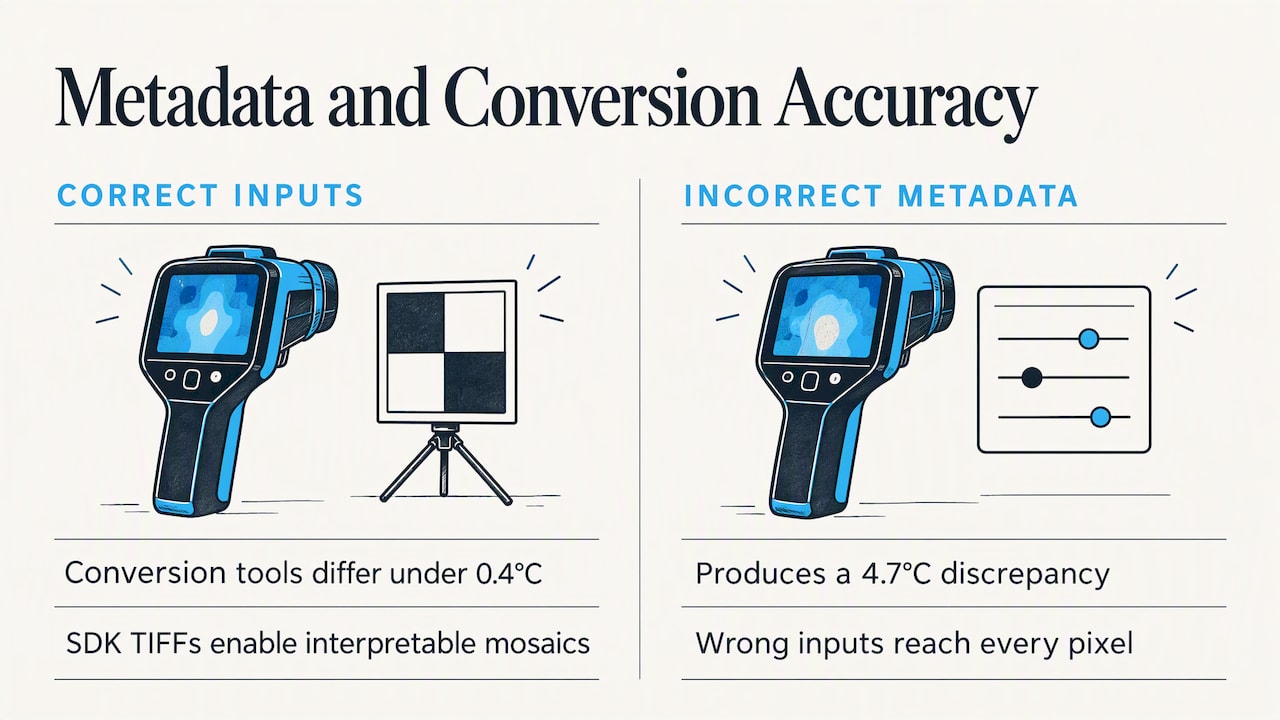
A 2026 study on processing thermal UAV data is blunt: direct mosaicking of R-JPEGs is scientifically invalid, and SDK-based conversion to TIFFs is essential for interpretable mosaics. The same study found that with correct acquisition parameters, two conversion tools differed by less than 0.4°C, but incorrect embedded metadata produced a 4.7°C discrepancy.
The lesson: check the metadata before you process. Emissivity, reflected temperature, humidity and distance feed the calculation, and wrong inputs travel straight into every pixel.
Some manufacturer tools handle this natively. The DJI Terra manual describes a thermal workflow that uses visible-light images for aerotriangulation, matches thermal images to their positions and produces a 2D temperature map with emissivity-based measurement and annotation.
How accurate is a drone thermal map?
More accurate than a guess, less accurate than a lab instrument. The main error sources are known, and you can manage most of them.
| Error source | What happens | What to do |
|---|---|---|
| Sensor drift | Uncooled sensors warm up in flight. One study reported 4.2°C error 5 minutes after liftoff, stabilizing to 1.8°C at 12 minutes. | Let the camera stabilize before mapping. Keep flights short. Calibrate. |
| Wrong emissivity | Wrong emissivity settings cause inaccurate readings, especially on low-emissivity materials. | Set emissivity per material. Note shiny metal as a limitation. |
| Bad metadata | A 4.7°C discrepancy in the study above. | Verify embedded parameters before conversion. |
| Solar loading | False values near solar noon on clear days. | Fly under cloud or outside midday hours. |
Calibration helps. In the Costa Rica study, the repeated empirical line calibration method achieved the lowest mean absolute error, 0.6°C. That is an agricultural research setting, so do not promise the same figure on a roof job. Promise what you tested.
One independent author calls thermal drift the defining problem in thermal mapping, with an uncooled sensor drifting two or three degrees over a twenty-minute flight. That fits the figures above and is a good reason to keep missions short and state your uncertainty in writing.
What a thermal mapping deliverable should contain
Clients rarely need a raw file. They need something they can read, trust and act on. Professional guidance from several fields points to the same ingredients.
A UK new-homes warranty body’s thermal imaging guide lists what a survey should include: site and customer, the thermographer’s name, qualifications and contact details, equipment specification, objectives, date and time, environmental conditions, suitable imagery, conclusions and recommendations. It also notes that the temperature scale beside each image gives numerical values, and that similar colors can represent different temperature ranges.
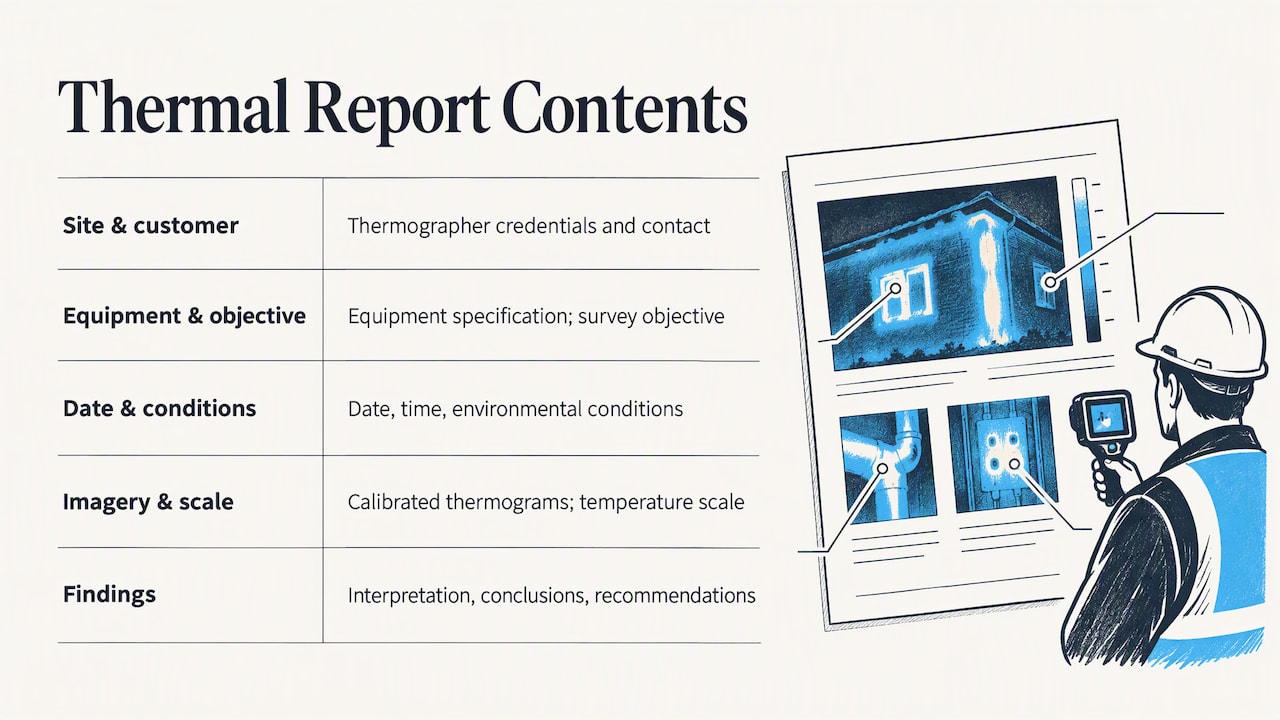
That last point is easy to miss. If two maps use different palettes and ranges, the same wall can look hot on one and mild on the other. Always show the scale.
Building-fabric survey guidance adds more: a full report should state the objective, prevailing environmental conditions such as wind and temperatures, the infrared technology, the site-specific method, calibrated thermograms, photographs showing where each thermogram was taken, interpretation and recommendations. It also says the report should account for emissivity variation and identify conditions that could compromise results.
For the geospatial side, a Texas DOT mapping specification shows what rigorous quality control looks like: acquisition certification with date, time and weather, orthophoto and point-cloud files with metadata, aerial-triangulation documentation and an RMSE report stating tested accuracy. You may not need all of it, but it is a good benchmark.
A practical checklist
- The thermal orthomosaic, with a labeled temperature scale and stated range.
- The numeric raster. Keep the underlying numeric raster so thresholds, palettes and classifications can change without reprocessing.
- An acquisition log with environmental and radiometric parameters, plus hotspot or anomaly polygons and a GCP and checkpoint report.
- A matching visible-light map, so the client can see what a hot spot actually is.
- Annotated findings with location, size and a recommended action.
- A method and limitations note covering emissivity assumptions and conditions on the day.
Some providers add a priority framework. One uses an optional P1 to P5 prioritization with custom ΔT thresholds. Whatever scheme you choose, define it in the report so the client knows what “high priority” means.
Comparing thermal maps over time
A single survey is a snapshot. The value grows when you repeat it: a roof every spring, a solar field every quarter, a slab during curing.
A peer-reviewed multi-temporal case study shows why consistency matters. It found that comparable raster datasets from multiple dates, times and sensors can be combined, and temperature-difference maps can reveal subtle changes. That only works if georeferencing and acquisition metadata are preserved for every date.
In practice, that means:
- Use the same flight plan, altitude and overlap each time.
- Fly at a similar time of day and in similar weather where you can, and log the differences when you cannot.
- Store every capture against the same site and date structure.
- Keep the same color scale when you compare dates.
Perspective: delivery is where thermal work usually breaks down
We see the same pattern with drone service providers. The flight goes well, the processing is careful, and then the result goes to the client as a zip file or a link to a generic folder. The client opens a GeoTIFF in the wrong viewer, sees a gray image, and asks why the map looks nothing like the PDF.
Thermal work makes this worse, because the meaning sits in the scale, the date and the context. That is why we built DataDelivery around structure: data organized by property, site and date, browsable on a map or a timeline, with annotations and reports on top. Clients compare captures over time without installing anything, and the work goes out under your brand, without per-seat fees or required client accounts.
Our advice for anyone selling thermal mapping is simple. Do the radiometric conversion properly, keep the numeric raster, state your uncertainty, and deliver in a place where the client can see every date together. The survey earns the first job. The delivery earns the repeat contract.
— User
Delivering thermal maps to clients with DataDelivery
If you run recurring thermal jobs, the delivery layer is worth getting right. DataDelivery lets you organize captures by site and date, browse them on a map view, annotate findings and produce client portals and reports. Our guide on viewing your deliverables shows what clients see, and how to share drone data with clients covers the workflow end to end.
If you want to check a GeoTIFF before sending it, our free GeoTIFF viewer opens it without uploading.
Plans start with a FREE tier at $0 per month. Paid plans are Starter at $12.99 per month ($129 per year), Basic at $29.99 per month ($299.99 per year), Premium at $79.99 per month ($799.99 per year) and Enterprise at $199.99 per month ($1999.99 per year). See the pricing page for what each tier includes. If you would rather not fly the job yourself, we also offer Turnkey Capture, which is priced per job.
FAQ
What is thermal mapping?
It is the production of a georeferenced map of surface temperature from overlapping infrared images. In aerial work, a drone carries a thermal camera, often with a visible camera, and software stitches the frames into one map. In logistics and pharma, the same words describe placing data loggers to measure temperature across a storage space.
What is the best time of day for a drone thermal map?
Choose times when sunlight is not heating surfaces unevenly. Flights around solar noon on a clear day can introduce false temperature values, while overcast conditions reduce solar effects. Early morning and after sunset are common choices. Night flights in the US may need a Part 107 waiver if you lack anti-collision lighting.
How accurate is a drone thermal map?
It depends on calibration, emissivity settings, metadata and sensor drift. Published studies report errors from under 0.4°C between processing tools with correct parameters to several degrees when metadata is wrong or the sensor has not stabilized. State your tested accuracy and your assumptions in every report.
What should I send a client after a thermal survey?
Send the thermal map with a labeled scale, a matching visible map, annotated anomalies, the date, time and weather, equipment details and a short method note. Keep the numeric raster as well, so palettes and thresholds can change without reprocessing.
Sources
- The Basics of Thermal Drones
- Drone Thermal Imaging: How It Works, Applications, and More
- Prodrone: Thermal Imaging
- Fusion of UAV-based infrared and visible images for thermal leakage mapping
- Maize canopy temperature extracted from UAV RGB and thermal imagery
- Thermal Mapping of Icelandic Geothermal Surface
- ArcGIS Drone2Map: Thermal camera support
- FAA: Part 107 Waivers
- Thermal Orthomosaic Processing in Python
- Best practices for processing thermal UAV data
- DJI Terra User Manual: Thermal overview
- Multispectral, Thermal & Index Mapping Pipelines
- Enhanced flight planning and calibration for UAV thermal mapping (Frontiers in Forests and Global Change)
- NHBC: Thermal imaging report guide
- Thermal Imaging of Building Fabric
- TxDOT UAS Aerial Mapping Specifications
- Thermal Drone Mapping with Metashape: RGB & IR Workflow
- Archaeological Remote Sensing Using Multi-Temporal data