Pix4D Alternatives for Drone Service Providers

Pix4D connects PIX4Dcatch, PIX4Dmatic and PIX4Dcloud in one workflow, with desktop processing in PIX4Dmatic. Many drone service providers only need to process their flights and hand finished maps to clients. This page covers PIX4Dcloud's 2026 pricing, what Pix4D does well, and the alternatives worth comparing.

Free plan, no credit card required.

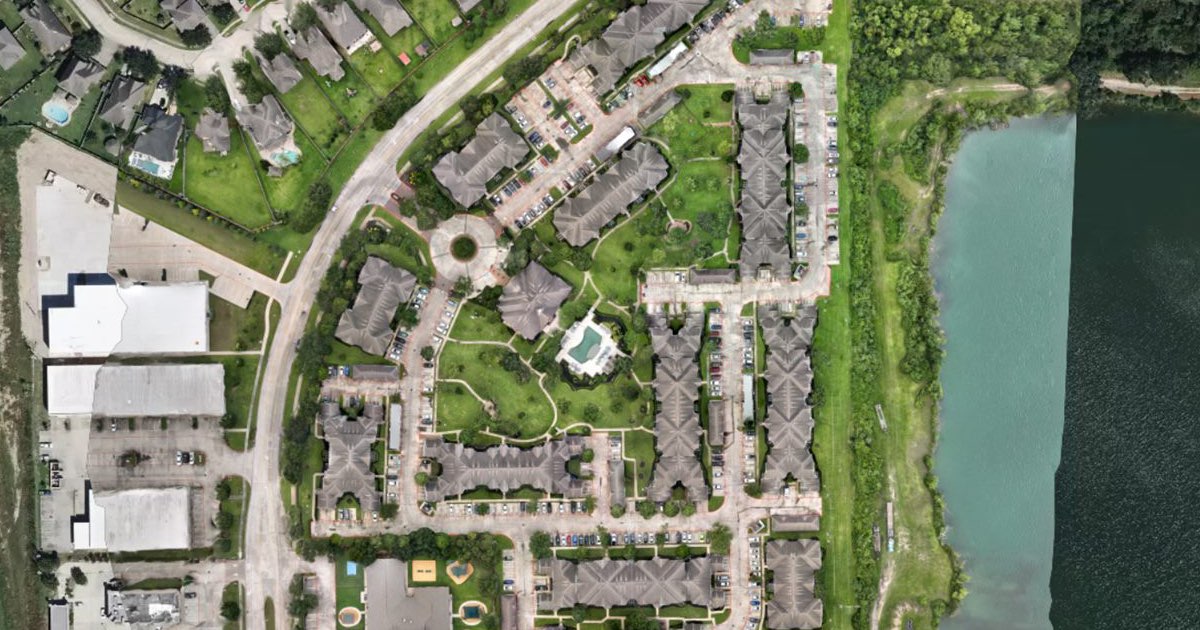
An orthomosaic of an apartment complex beside a lake, open on an interactive map in DataDelivery
An orthomosaic on the interactive map in DataDelivery, open in a web browser.

Should you stay on Pix4D or switch?

Stay on Pix4D if you want control of each processing step on your own computer: PIX4Dmatic handles large datasets without splitting projects, calibrates and georeferences with ground control points and coordinate systems, and exports terrain models, TIN and contour lines ready for CAD and GIS. PIX4Dcloud includes unlimited users on Starter, Pro and Enterprise, its share links open without a login, and PIX4Dmatic runs on Windows and on Apple silicon Macs. Those are real strengths, and DataDelivery does not replace them.

Look at an alternative if you are a small drone service provider who flies, processes and delivers client work, and you want a free plan to start and one browser tool for processing and delivery.

PIX4Dcloud pricing in 2026

Prices and plan details checked on on Pix4D's own pricing pages.

  • Starter: $129 a month billed monthly, with 40 processing credits a month, or $1,290 billed yearly, with 500 credits a year. Pix4D calls it its best plan for individuals.
  • Pro: $449 a month billed monthly, with 200 processing credits a month, or $4,490 billed yearly, with 2,500 credits a year.
  • Enterprise: a custom price. It adds Teams access control, API access, webhooks, SSO, custom integrations and custom storage, and works with drone dock platforms.
  • Free trial: a free 15-day plan, no credit card required.

PIX4Dcloud alternatives for sharing maps with clients

We make DataDelivery. The other tools are described from each vendor's own pricing and help pages, so you can compare how each Pix4D competitor lets a client open your maps.

Vendor details checked on .

PIX4Dcloud

  • Two kinds of share link, View and measure only, or Edit and save. Both open the dataset without logging in.
  • People using a share link cannot download outputs or export files, and cannot generate or download PDF annotation reports.
  • Embedded maps are for viewing only, with no measurement tools or annotations, and are served from a 24-hour cache.
  • With PIX4Dcloud Pro, link users can move between a site's datasets and compare them over time.
  • Unlimited users on Starter, Pro and Enterprise.

DataDelivery

  • One no-login link per job covers the files, maps and imagery from every dated site visit, including on the Free plan. Reports have their own links, and point clouds are switched on per link.
  • No-login links are view-only by default. Clients you invite by email can download originals, folders as ZIPs and point clouds as LAZ, for the files you allow.
  • Clients you invite by email can compare two orthomosaics with a before and after slider, see photos taken from the same spot on different dates when you fly repeatable shots, and compare two point clouds side by side.
  • Put your own logo on client-facing pages and emails, starting on the Basic plan.

DroneDeploy

  • A view-only link to a single map date opens without a DroneDeploy login on all paid accounts, and you can embed it on a website.
  • Flight & Analysis costs $4,188 billed annually. Other plans are quote only, so contact DroneDeploy.

Compare DroneDeploy alternatives

Birdi

  • View-only sharing on every Birdi plan. Viewers can also download starting on Growth.
  • A branded workspace with your logo, starting on Plus.
  • Plus: $60 a month billed annually, or $80 billed monthly, with 1 user and 20 guest seats. Growth: $287 a month, billed annually only, with 5 users and 50 guest seats. Ultimate: contact Birdi.
  • 7-day free trial on Plus.

Maps Made Easy

  • Branding-free map sharing for paid jobs.
  • Free: 3 maps per 24 hours, 1 free processing gigapixel, and up to 50 images per map.
  • Base: $5 a month or $50 a year. The Pro and Elite plans raise the image and map limits.

Desktop alternatives to PIX4Dmatic

Prices and system requirements checked on on each vendor's own site.

PIX4Dmatic

Analyst costs $229 a month or $2,290 a year, Standard $399 a month or $3,990 a year, and Pro $499 a month or $4,990 a year.

Pix4D says PIX4Dmatic supports both Windows and macOS. It needs Windows 11 (64-bit) or macOS Sequoia (15) on an Apple M1 chip or newer. Intel Macs stay on version 1.63, and there is no CUDA acceleration on macOS. Pix4D's other desktop app, PIX4Dmapper, costs $399 a month or $3,990 a year, with a floating license used on one device at a time.

Agisoft Metashape

Metashape 2.3.2 has Windows, macOS and Linux installers for both Standard and Professional. Standard costs $179 and Professional $3,499, each a node-locked license.

DJI Terra

DJI says DJI Terra needs Windows 10 or later (64-bit) and an NVIDIA graphics card, and is not compatible with other operating systems, such as macOS. On the US DJI Store, Standard costs $1,850 for a yearly subscription or $5,280 permanent, and Flagship $3,700 a year or $10,580 permanent.

RealityScan

RealityScan is free if your revenue is under $1 million (USD), and $1,250 per seat per year above that. Epic says it runs mainly on Windows, with a Linux version for command-line work, and no macOS version is listed. It needs an NVIDIA CUDA GPU to build models.

PIX4Dcloud vs DataDelivery

PIX4Dcloud and DataDelivery compared, checked October 8, 2026
What you need PIX4Dcloud DataDelivery
Where it fits The cloud step of Pix4D's PIX4Dcatch, PIX4Dmatic and PIX4Dcloud workflow Drone service providers who process and deliver client work in a browser
Price to start Free 15-day plan with no credit card, then Starter, billed monthly or yearly Free plan with no credit card, then paid plans listed on the pricing page
Processing Included through processing credits, for example 40 a month on Starter billed monthly NDS Processing on every plan, including Free, with daily runs; higher plans include more
Seats Unlimited users on Starter, Pro and Enterprise No per-seat fees; people you share with do not need a paid plan
No-login client link Two link types, View and measure only, or Edit and save; both open without logging in One no-login link per job covers the files, maps and imagery from every dated site visit, including on the Free plan. Reports have their own links, and point clouds are switched on per link.
Downloads for clients Link users cannot download outputs or export files No-login links are view-only by default; clients you invite by email can download the files you allow
Comparing site visits On Pro, link users can move between a site's datasets and compare them over time Each job holds dated site visits on a timeline; invited clients can compare two orthomosaics with a before and after slider
Connections to other tools API access, webhooks and custom integrations on Enterprise Maps from other mapping software by GeoTIFF and LAS/LAZ file import, with no app-specific connectors; no public API

DataDelivery

Best for small DSPs who process and deliver in one browser tool.

  • NDS Processing turns overlapping drone photos into map products, with five goal presets: Default, Orthophoto / 2D Mapping, 3D Model, Buildings / Structures, and Terrain & Volumes.
  • Each run produces a stitched orthophoto, elevation models (DSM and DTM), a 3D point cloud, contour lines and a textured 3D model. You can download the orthophoto GeoTIFF and the LAS or LAZ point cloud. You view the elevation models, contours and 3D model in the browser.
  • Every plan, including Free, includes daily NDS Processing runs; higher plans include more.
  • Map View puts every deliverable in place: overlay one or more orthomosaics by site visit and see where each photo was taken, with hover previews. 3D point clouds open in the browser, where you can orbit and zoom through the site.
  • Each job holds multiple dated site visits (captures) on a timeline, and you can compare any two orthomosaics with a before and after slider.
  • There are no per-seat fees. Public links expire after 90 days by default, and you can move the date. See how many times each link was opened, and revoke it instantly.
  • Put your own logo on client-facing pages and emails from the Basic plan. On Premium and Enterprise, deliver from your own address, such as portal.yourcompany.com.
  • What it does not do: no ground control point processing, no RTK or PPK corrections, no LiDAR or thermal processing, and no public API.

DataDelivery has a Free plan and paid plans you can pay monthly or yearly. Every plan, including Free, includes daily NDS Processing runs; higher plans include more.

See current DataDelivery plans

Comparing more tools on price? See drone mapping software pricing.

DataDelivery may fit if

  • You fly, process and deliver client work yourself, and want it in one browser tool.
  • You want to start on a Free plan with no credit card.
  • Your clients should open maps and photos from a no-login link, or from an email invite at no extra cost.
  • You do repeat visits and want every visit in one job on a timeline.

Pix4D may fit better if

  • You want control of each processing step on your own computer.
  • You calibrate and georeference with ground control points and coordinate systems.
  • You deliver CAD and GIS exports such as a DTM, a TIN (LandXML) or contour lines.
  • You want unlimited users on a cloud plan.

Pix4D alternatives: common questions

Is Pix4D free?

No. Pix4D offers a free 15-day plan with no credit card required. After that you need a paid plan. If you want a free place to start, DataDelivery has a Free plan with no credit card, and every plan, including Free, includes daily NDS Processing runs.

How much does PIX4Dcloud cost?

As of October 8, 2026, Pix4D's pricing page lists PIX4Dcloud Starter at $129 a month billed monthly or $1,290 billed yearly, and Pro at $449 a month billed monthly or $4,490 billed yearly. Enterprise has a custom price, so contact Pix4D.

Do PIX4Dcloud link viewers need an account?

No. PIX4Dcloud has two kinds of share link, View and measure only, and Edit and save, and both open the dataset without logging in. People using a link cannot download outputs or export files. DataDelivery's no-login links also open without an account, including on the Free plan.

Can my clients download files in DataDelivery?

Yes, clients you invite by email can download originals, folders as ZIPs and point clouds as LAZ, for the files you allow. No-login links are view-only by default.

Can I bring maps I processed in other software?

Yes. Import a finished orthomosaic, DSM, DTM (GeoTIFF) and LAS/LAZ point cloud into a DataDelivery job. Each file is checked automatically, then it appears in the Products folder ready to view, measure and share. There are no app-specific connectors, so each file has to pass the checks.

Try DataDelivery on the Free plan

Free plan, no credit card required.

Competitor features and pricing were last reviewed on October 8, 2026 using publicly available vendor documentation. Product details may change. DataDelivery and National Drone Services are not affiliated with or endorsed by Pix4D, DroneDeploy, Birdi, Maps Made Easy, Agisoft, DJI or Epic Games. Product and company names are trademarks of their respective owners. Where a vendor's pricing is quote-based or tier-specific, we say to contact that vendor rather than estimate a figure.

Sources