Remote construction monitoring means tracking what is happening on a job site without standing on it. You collect visual and measured data with drones, fixed cameras, sensors or scans. You then review it in one place, compare it to earlier captures, and share it with the people who make decisions. Done well, it replaces a lot of site visits with a clear, dated record of progress, quantities and conditions.
This guide covers the main capture methods and what each one shows, how to organize the data so it stays useful, where remote monitoring falls short, and how to set up a workflow that holds up over a full project.
TL;DR
- Remote monitoring combines capture (drones, cameras, sensors, scans) with a place to store, compare and share the results.
- Drone mapping gives the broadest view of progress: orthomosaics, 3D models and point clouds, captured on a repeatable schedule.
- The data is only as good as its organization. Sort by site, date and data type so you can compare any two captures.
- Weather, occlusions and review time are real limits, so plan capture frequency and a backup method.
- Our DataDelivery™ platform handles the organizing, processing, comparing and sharing, with plans starting free.
Table of Contents
- What remote construction monitoring tells you
- Remote monitoring methods and what each one shows
- How to organize remote monitoring data so you can compare it
- Benefits and limits to plan for
- Setting up a reliable remote monitoring workflow
- Our perspective
- Who does what: contractors, providers and property managers
- Getting started with DataDelivery™
- FAQ
- Sources
What remote construction monitoring tells you
A remote monitoring program answers a handful of practical questions without a site walk:
- Progress: What has been built since the last capture, and does it match the schedule?
- Quantities: How much material is on site, and how much earth has moved?
- Conditions: Is there standing water, erosion, damaged equipment or blocked access?
- Documentation: What did the site look like on a specific date if a dispute or claim arises?
- Communication: Can owners, lenders and subcontractors see the same picture at the same time?
The last point matters more than it first appears. Research on UAV-based progress monitoring notes that drones and photogrammetric records can improve how progress is visualized and communicated. A shared, current picture reduces back-and-forth about what is actually done.
Remote monitoring methods and what each one shows
No single tool covers everything. Most teams combine two or three. Here is how the main options compare.
| Method | What it captures | Best for | Main limit |
|---|---|---|---|
| Drone photogrammetry | Orthomosaics, 3D models, point clouds | Progress, earthwork, stockpiles, roofs | Weather and flight rules |
| Fixed time-lapse cameras | One fixed view, continuous | Daily activity, deliveries, security | One angle, no measurement |
| Laser scanning | Dense, accurate point clouds | Interiors, as-built checks | Equipment cost, slower coverage |
| Sensors and IoT | Dust, noise, vibration, air quality | Environmental compliance | No visual of progress |
| Location tracking (GPS, UWB, RFID) | Positions of people, machines, tagged materials | Logistics, equipment use | Needs tags and infrastructure |
An academic review of automated data acquisition in construction lists these same families: UAV photo and video-based 3D modeling, laser scanning for accurate point clouds, and real-time location technologies such as GPS, robotic total stations and UWB, with RFID for tracking tagged materials.
Drones and photogrammetry
Drones are the workhorse of remote monitoring on open sites. A flight over a grading project, a building pad or a laydown yard produces overlapping photos. Processing turns them into a map-accurate orthomosaic, a 3D model and a point cloud.
Why teams choose this method: a 2021 academic study on digital tools for construction monitoring describes photogrammetry as the most economical and efficient technique for obtaining 3D point clouds for progress documentation. The same study notes that geospatial techniques such as GPS can support centimeter-level length, area and volume measurements.
What you can pull from a single capture:
- Overall progress against the plan on a top-down map
- Distances, areas and elevations
- Stockpile volumes and cut and fill from contours
- Visual evidence of roof, facade and site conditions
If you want to see how measurement tools work on this kind of data, our guide to measurements and analysis walks through them.
Fixed cameras
Fixed cameras give you a continuous view from one position. They are good for seeing when concrete trucks arrive, how crews are staffed, and whether anything unusual happened overnight. They cannot measure volumes or show what is behind a structure. Treat them as a complement to periodic mapping, not a replacement.
Scanning and sensors
Terrestrial laser scanners produce very accurate point clouds, which is useful for verifying as-built conditions indoors or on complex structures. Environmental sensors cover a different need: dust, noise and air quality for compliance. They tell you about conditions, not progress.
Tracking and automation
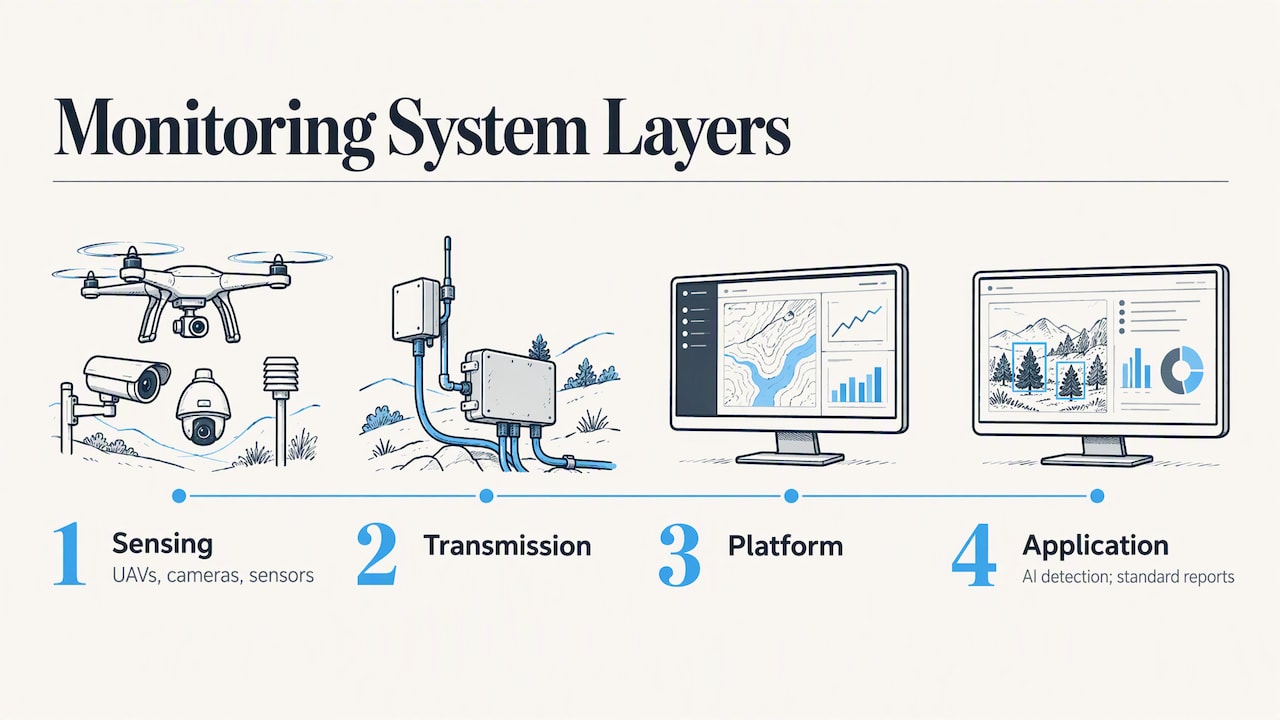
Positioning technologies help when your question is where things are, not what has been built. Professional standards for UAV-based supervision in China, such as T/CS 242-2025, describe monitoring systems in four layers: sensing (UAVs, cameras, sensors), transmission, a platform layer and an application layer. They also describe AI-based detection of incidents such as workers without safety gear, and automatic generation of standardized inspection reports. Treat that as one country’s technical standard rather than a US requirement, but the layered model is a useful way to think about any system.
How to organize remote monitoring data so you can compare it
Capturing data is the easy part. Six months in, the real problem is finding the right capture and comparing it with another one.
The same Chinese standard recommends unified naming by project, capture time and data type, with archiving and retrieval for historical queries and comparisons, plus standard reports for export. That maps well to US practice. A simple structure looks like this:
- Property or project: one record per job site.
- Site or area: phases, pads, buildings or zones within the project.
- Capture date: every flight or scan dated and never overwritten.
- Data type: orthomosaic, point cloud, 3D model, photos, reports.
- Annotations: notes tied to a location and a date, not buried in email.
With this in place, you can open a map, pick two dates and see what changed. This is where generic file sharing fails. A shared folder holds files, but it does not know that three orthomosaics belong to the same site on three different dates.
Map and timeline browsing
Browsing by map is the fastest way for a project manager or owner to find something. Click the area, then pick the date. Our Map View guide shows how site browsing works in DataDelivery™. Timeline browsing does the same from the other direction: pick a date range and see every capture inside it.
Comparing over time
Change over time is the core value of repeated captures. A single orthomosaic is a snapshot. A series shows the pace of work, where the schedule is slipping, and whether a stockpile is growing or shrinking. For a closer look at this use case, see our construction progress portal.
Sharing without friction
Owners, lenders and subcontractors rarely want another login or a software download. Point clouds and orthomosaics can be heavy, so viewing them in a browser matters. We cover the practical side in how to share orthomosaics with clients and how to share point clouds.
Benefits and limits to plan for
Remote monitoring is not magic, and the research is clear about the trade-offs.
Benefits
- Fewer site visits for routine checks
- A dated, visual record that supports payment applications and dispute resolution
- Shared visibility for people who cannot be on site
- Measured quantities from the same data you use for visual review
Limits
- Occlusions and view limits. Site photographs are limited by what the camera can see, and by resolution versus distance, according to the UAV progress monitoring study. Aerial capture helps, but interiors and covered areas still need other methods.
- Review time. The same research notes that reviewing large image sets by hand is labor-intensive. Structured browsing and comparison tools reduce this.
- Weather. Wind, rain and low visibility can delay or interrupt UAV flights, so build slack into the capture schedule.
- Model integration. Merging real-time field data with BIM is still maturing. A 2023 review from TU Dublin researchers describes it as early stage, with open questions about feasibility. Do not promise a fully automated as-built model to your client.
Setting up a reliable remote monitoring workflow
A workable program is mostly planning and consistency. Use this sequence.
- Define the questions. Progress by phase? Stockpile volumes? Monthly owner reports? The answers set your capture method and frequency.
- Choose a cadence. Weekly or biweekly flights suit most active earthwork and vertical projects. Slower phases can go monthly. Keep the schedule the same so comparisons are meaningful.
- Standardize each capture. Use the same flight plan, altitude and overlap each time. Consistent ground control or RTK positioning keeps captures aligned from one date to the next.
- Check pilot qualifications and airspace. In the US, commercial flights under Part 107 require a Remote Pilot Certificate from the FAA, with recurrent online training every 24 calendar months. Check airspace authorization before flying near airports.
- Process and archive securely. Keep raw data and deliverables, name them consistently, and control who can see them.
- Report on a rhythm. Send the same view of the same site on a predictable schedule, with annotations on anything that needs action.
On equipment, the Chinese T/CS 242-2025 standard sets a benchmark worth noting for any enterprise drone: IP54 protection, centimeter-level RTK positioning and at least 50 minutes of endurance. It is not a US rule, but it is a reasonable checklist when you compare aircraft.
Our perspective
We built DataDelivery™ because capture is rarely where remote monitoring breaks down. Pilots can fly a good mission. The trouble starts afterward: data scattered across drives, clients asked to download huge files, and no easy way to put last month next to this month.
We think a monitoring workflow should meet four tests:
- Organized by site and date. If you cannot find a capture in seconds, the record loses value.
- Viewable in a browser. Clients should not need processing software to see a point cloud or measure a pile.
- Comparable over time. Change is the story, so comparison should be a built-in action, not a project.
- Delivered under your brand. Service providers should look like themselves, without per-seat fees or required client accounts.
We also believe in matching tools to the job. A fixed camera is great for activity. Sensors are essential for compliance. Aerial mapping is strongest for progress and quantities. The best programs combine them and keep the aerial data in one organized home. For service providers, our post on why drone service providers should care about DataDelivery™ explains the thinking in more detail.
— User
Who does what: contractors, providers and property managers
The workflow looks a little different depending on who you are.
Construction firms usually want a repeatable progress record tied to the schedule, plus quantities for pay applications. A recurring capture, a map view and a few annotated comparisons cover most needs. Our construction page describes turnkey aerial data for these projects.
Drone service providers need to deliver consistently to many clients without rebuilding a process each time. Structured sites, shareable portals and reports under your own branding save hours per job. You can see how this works in our white-label client portal.
Property managers often care about condition more than progress: roofs, parking areas, drainage and exterior changes between inspections. Dated captures give you an objective before-and-after. See our page on drone services for property management.
Earthwork and aggregates teams lean on volume tools. If stockpile reporting is your main use, look at our stockpile measurement and client reporting page.
Getting started with DataDelivery™
DataDelivery™ is our platform for organizing, processing, visualizing and delivering drone data. It supports map-based and timeline browsing, orthomosaic and point cloud generation, 3D model viewing, stockpile and contour measurement tools, annotations, shareable client portals and recurring capture management. It also works with DroneCRM and external mapping software.
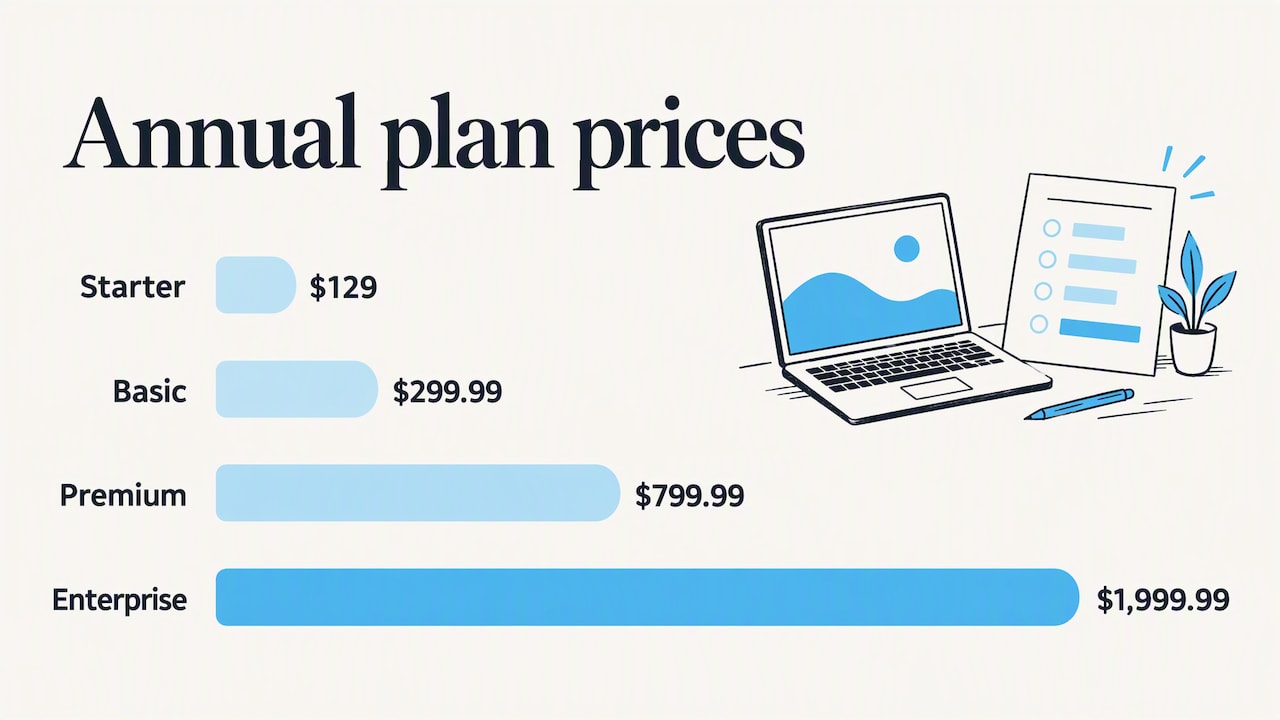
Plans are self-serve and tiered by usage (jobs, processing runs and storage). Published prices on our pricing page:
| Plan | Monthly | Yearly |
|---|---|---|
| FREE | $0 | n/a |
| Starter | $12.99 | $129 |
| Basic | $29.99 | $299.99 |
| Premium | $79.99 | $799.99 |
| Enterprise | $199.99 | $1,999.99 |
Start with the free plan to organize a single site and see how comparison works, then move up as your job count and storage grow. If you would rather not fly the site yourself, we also offer turnkey aerial capture, with the data delivered through the same portal. Learn more on our platform page or ask about turnkey capture.
FAQ
What is the best way to monitor a construction site remotely?
There is no single best method. For progress and quantities, scheduled drone mapping gives the widest coverage. Add fixed cameras for daily activity and sensors if you have environmental compliance duties. Keep everything organized by site and date so you can compare captures.
How often should I capture a construction site?
Weekly or biweekly suits most active projects, and monthly works for slow phases. What matters most is consistency, because comparisons only work when captures use similar flight plans and timing. Plan extra days for weather delays.
Do I need a license to fly a drone for construction monitoring?
In the US, commercial drone flights generally require a Remote Pilot Certificate under FAA Part 107. Pilots must be at least 16, pass the FAA knowledge exam and complete recurrent training every 24 calendar months. Check the FAA page for current requirements and airspace rules.
Can clients view the data without installing software?
Yes, if the data is delivered through a browser-based portal. With DataDelivery™, clients can open maps, orthomosaics and point clouds through a shared link, without required client accounts.
Sources
- Unmanned Aerial Vehicles (UAVs) for Physical Progress Monitoring of Construction (PMC)
- Automated Data Acquisition in Construction with Remote Sensing Technologies (MDPI, 2020)
- Interoperability of Digital Tools for the Monitoring and Control of Construction Projects (MDPI, 2021)
- T/CS 242-2025 UAV intelligent supervision standard (China)
- Synergising BIM and Real-Time Data for Improved Efficiency (TU Dublin, 2023)
- FAA: Become a Certificated Remote Pilot